dns 内外网解析.note
类似 Linux的 view 解析
一、基于地址的 内外网解析:
1、配置内外网解析:
这里只匹配外网网段即可,内网网段让其使用默认的本地解析
(1)创建客户端子网(匹配客户端网段):
Add-DnsServerClientSubnet -Name outside -IPv4Subnet 113.64.0.0/30,180.160.0.0/30,48.92.0.0/29(2)创建一个dns区域
Add-DnsServerZoneScope -ZoneName ecskill.org -Name outside_scope(3)在区域中添加记录:
# 添加 @ 记录(注意 @ 必须要加上双引号):
Add-DnsServerResourceRecord -ZoneName ecskill.org -A -Name "@" -IPv4Address 180.160.0.2 -ZoneScope outside_scope

# 添加 A记录(直接写*就可以了):
Add-DnsServerResourceRecord -ZoneName ecskill.org -A -Name * -IPv4Address 180.160.0.2 -ZoneScope outside_scope
(4)创建dns策略(关联子网和dns记录):
Add-DnsServerQueryResolutionPolicy -Name policy -Action ALLOW -ClientSubnet "EQ,outside" -QType "EQ,A" -ZoneScope outside_scope -ZoneName ecskill.org带有逗号的内容才需要双引号,但是全部参数值都加上双引号也是没问题的
·测试:
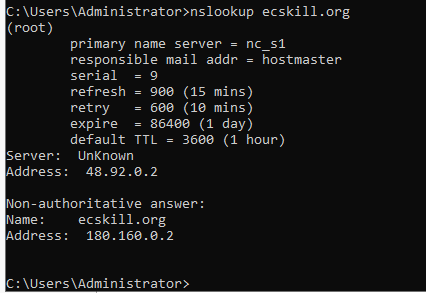
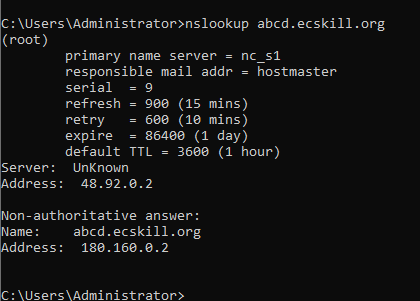
外网客户端测试:
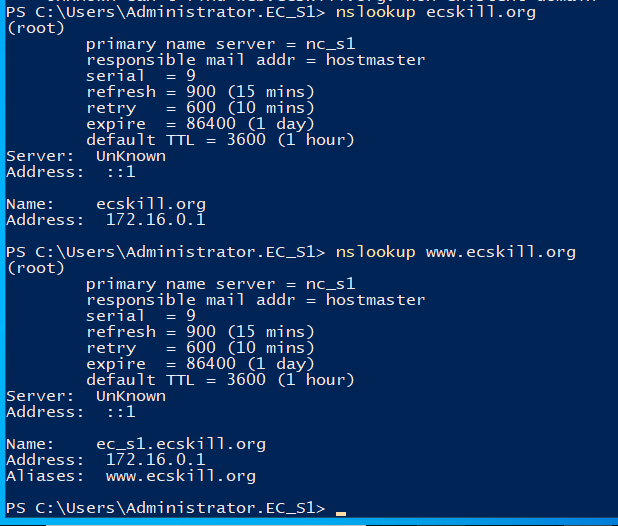
内网客户端测试:
因为没有匹配内网客户端地址,因此内网客户端使用的是dns服务器进行解析,而非dns策略
2、如果要删除策略:
# 删除策略:
remove-DnsServerQueryResolutionPolicy -Name policy   -ZoneName "ecskill.org"
# 删除dns记录:
Remove-DnsServerResourceRecord -ZoneName ecskill.org -RRType A -Name "@" -ZoneScope outside_scope
Remove-DnsServerResourceRecord -ZoneName ecskill.org -RRType A -Name * -ZoneScope outside_scope# 删除dns区域:
Remove-DnsServerZoneScope -ZoneName ecskill.org -Name outside_scope# 删除客户端子网:
Remove-DnsServerClientSubnet -Name outside二、基于时间的解析:
不同的时间访问DNS服务器,将域名解析到不同的地址
与上面的配置类似,只是在 配置 DnsServerQueryResolutionPolicy 时多指定了时间而已
1、配置 shanghai.org:
因为配置了 -zonename 因此仅针对 shanghai.org 这一个域
# 创建dns区域:
Add-DnsServerZoneScope -Name zone1 -ZoneName shanghai.org

# 添加 @记录和A记录:
## @记录:
Add-DnsServerResourceRecord -ZoneName shanghai.org -A -Name "@" -IPv4Address 192.168.1.1 -ZoneScope zone1
## A记录:
Add-DnsServerResourceRecord -ZoneName shanghai.org -A -Name * -IPv4Address 192.168.1.1 -ZoneScope zone1

# 指定该策略只有在特点的时间才会生效:
Add-DnsServerQueryResolutionPolicy -Name policy1 -Action ALLOW -TimeOfDay "EQ,08:00-20:00" -ZoneScope zone1 -ZoneName shanghai.org
·测试:
目前时间是 下午 3.26 符合DNS策略定义的时间范围内:
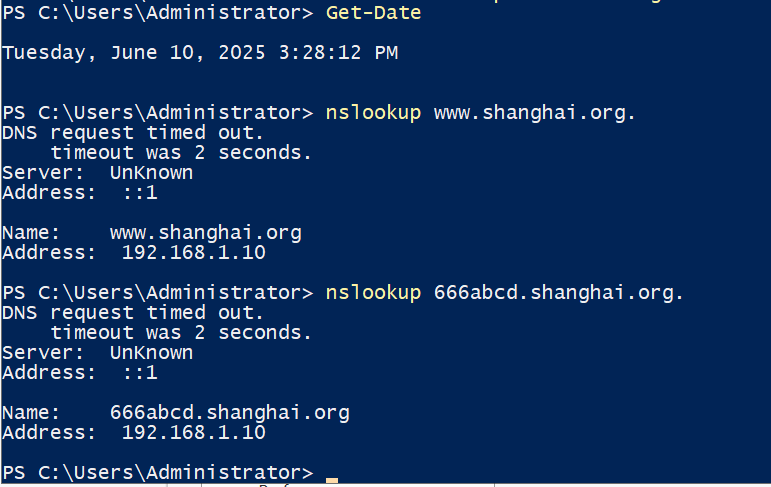
将时间设置到指定范围之外:
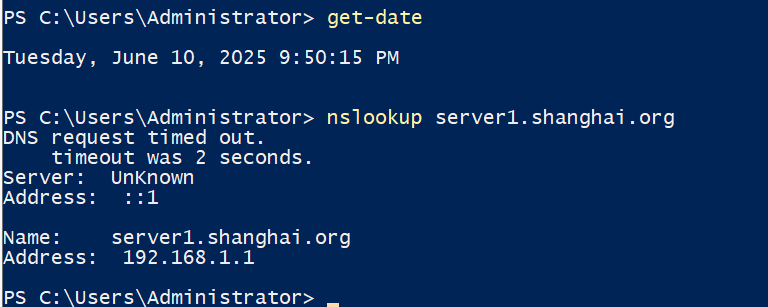
更改时间之后,就会使用本地的DNS数据库了: