配置 BGP 动态路由(windows BGP).note
· 环境:
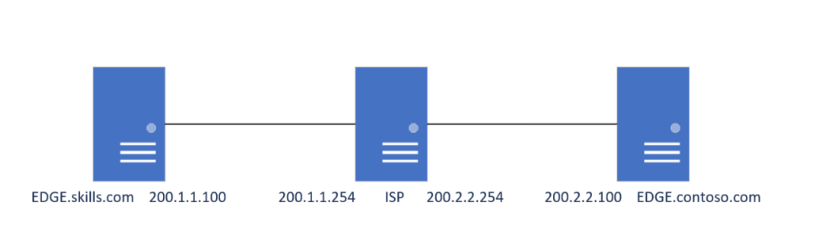
·(注意)每台机器都要敲这个命令:
允许 bgp 传递路由,否则bgp接收到邻居传递的路由之后不会将它传递给另一个邻居
Set-BgpRouter -TransitRouting Enabled -Force
# 敲完之后重启邻居:
stop-bgppeer -name ...
start-bgppeer -name ...
先配置初始化、安装 RRAD:
ISP:
netsh interface ip set address Ethernet0 static 200.1.1.254 255.255.255.0
netsh interface ip set address Ethernet2 static 200.2.2.254 255.255.255.0

netsh advfirewall set allprofile state off    //关闭防火墙
· ISP(Server-core)上安装 Routing 功能:
get-windowsfeature    //可以先查找,然后找到路由功能后再下载
install-windowsFeature routing -IncludeManagementtools

## 安装完成后重启其它两台机器也是大致一样的配置(图形化直接按照 路由功能然后启用即可)
一、配置 BGP(使用 powershell 配置):
1、EDGE.skills.com 配置:
install-windowsFeature routing -IncludeManagementtools    //安装路由功能(如果是图形化的,那就使用图形化安装)
# 如果是使用命令安装的,那么需要重启

add-bgprouter -bgpidentifier 200.1.1.100 -localasn 100
add-bgppeer -localipaddress 200.1.1.100 -peeripaddress 200.1.1.254 -peerasn 100 -name ISP    //-name 最好输入对端的 FQDN(因为-name 最后会显示为对端的名称【类似 Router-id】)
· 如果添加时提示 BGP 已经存在,那么就可以删除 BGP进程:

remove-bgprouter2、ISP 配置:
install-windowsFeature routing -IncludeManagementtools    //安装路由功能(如果是图形化的,那就使用图形化安装)
# 如果是使用命令安装的,那么需要重启

add-bgprouter -bgpidentifier 200.1.1.254 -localasn 100
add-bgppeer -LocalIPaddress 200.1.1.254 -peeripaddress 200.1.1.100 -peerasn 100 -name EDGE.skills.com
add-bgppeer -localipaddress 200.2.2.254 -peeripaddress 200.2.2.100 -peerasn 200 -name EDGE.contoso.com
add-bgpcustomroute -network 200.2.2.0/24    //通告网段给其它BGP邻居
add-bgpcustomroute -network 200.1.1.0/24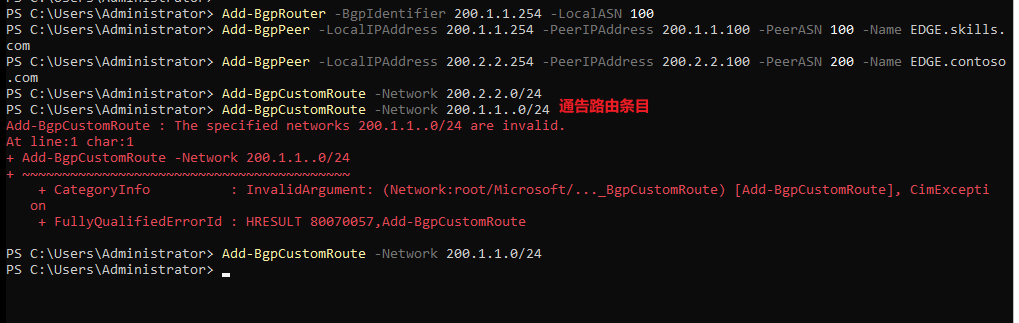
· 如果创建 BGP 进程时报错,那么就需要修改注册表:

注册表路径:HKEY_LOCAL_MACHINE\SYSTEM\CurrentControlSet\Services\RemoteAccess
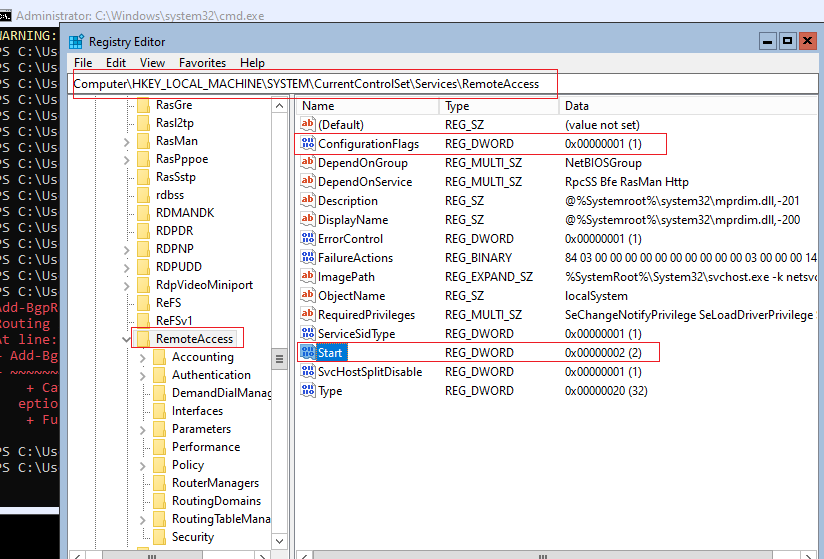
将 ConfigurationFlags 设置为 1
将 Start 设置为 2

然后重启机器
重启后再创建就能成功:

3、EDGE.contoso.com配置:
install-windowsFeature routing -IncludeManagementtools    //安装路由功能(如果是图形化的,那就使用图形化安装)
# 如果是使用命令安装的,那么需要重启

add-bgprouter -bgpidentifier 200.2.2.100 -localasn 200
add-bgppeer -Localipaddress 200.2.2.100 -peeripaddress 200.2.2.254 -peerasn 100 -name ISP
二、查看 BGP:
1、查看 BGP 邻居:
get-bgppeerISP:

EDGE.skills.com:

EDGE.contoso.com:

2、查看 BGP 路由:
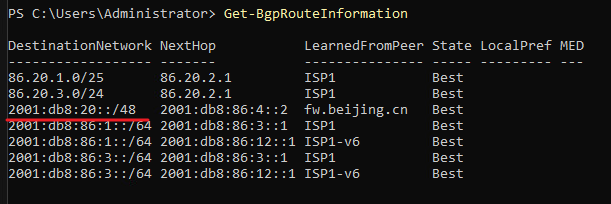
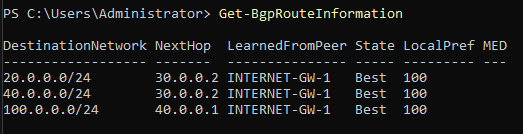
get-bgprouteinformation
三、配置 反射器:
1、设置本地为反射器服务端:
Set-BgpRouter -RouteReflector enabled -ClusterId 1
# 或者在添加时就直接设置为反射器:
add-BgpRouter -BgpIdentifier 40.0.0.1 -LocalASN 200 -RouteReflector enabled -ClusterId 1
2、设置反射器客户端:
Set-BgpPeer -name INTERNET-GW-1 -RouteReflectorClient $true
# 或者在添加时设置:
add-BgpPeer -name INTERNET-GW-1 -LocalIPAddress 20.0.0.2 -PeerIPAddress 20.0.0.1 -PeerASN 200 -RouteReflectorClient $true
四、配置 路由策略:
1、修改下一跳:
# 创建路由策略:
## 不指定 -MatchPrefix 就是直接匹配所有路由:
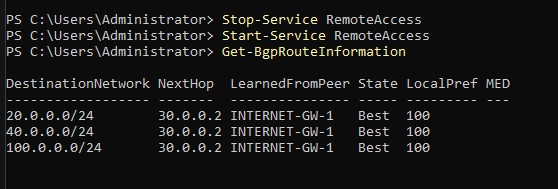
Add-BgpRoutingPolicy -Name INTERNET-1  -NewNextHop 30.0.0.2 -PolicyType ModifyAttribute
Set-BgpRoutingPolicyForPeer -PeerName INTERNET-1 -PolicyName INTERNET-1 -Direction Egress
# in方向:igress
# out方向:egress
## 配置完之后这里要重启一下RemoteAccess,不然要等很久才会自己更新路由
修改之前:
修改之后:
五、设置路由聚合(路由汇总):
## 支持IPv4和IPv6
# 创建路由聚合:
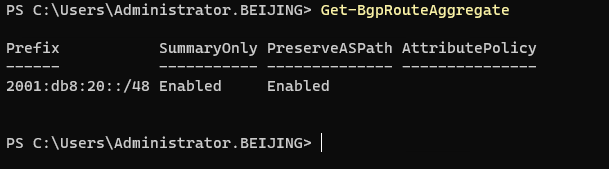
Add-BgpRoute-Aggregate -Prefix 2001:db8:20::/48 -SummaryOnly Enabled

# 然后将路由通告出去:
Add-BgpCustomRoute -Network 2001:db8:20::/48
本地查看:
邻居查看: