3-20 C-Cisco.note
一、EEM:
1、Sw1、Sw2上禁用vlan 10:
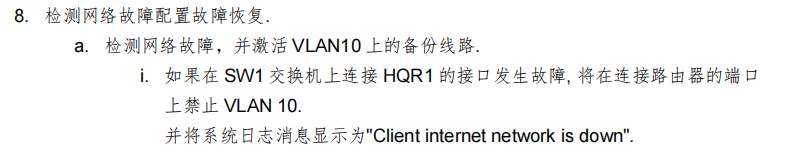
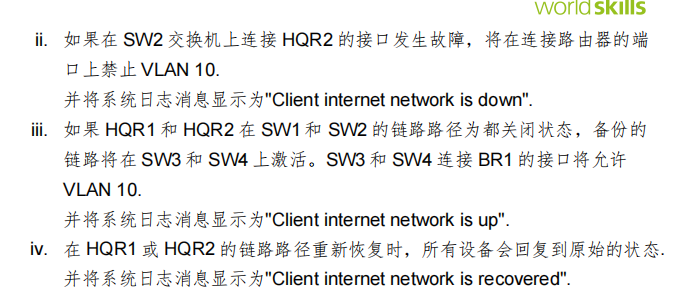
# Sw1、Sw2(相同配置):
int g1/1
 no sw tr al vl
 sw tr al vl remove 20
 exit

track 10 interface gigabitEthernet 1/1 line-protocol
event manager applet DOWN

 event syslog pattern "10 interface Gi1/1 line-protocol Up -> Down"

 action 1 cli command "enable"

 action 2 cli command "conf t"

 action 4 cli command "interface gigabitEthernet 1/1"

 action 5 cli command "sw tr al vl remove 10,20"

 action 7 cli command "end"

 action 8 syslog msg "Client internet network is down"

event manager applet RECOVERED

 event syslog pattern "10 interface Gi1/1 line-protocol Down -> Up"

 action 1 cli command "enable"

 action 2 cli command "conf t"

 action 4 cli command "interface gigabitEthernet 1/1"

 action 5 cli command "switchport trunk allowed vlan 1-19,21-4094"

 action 7 cli command "end"

 action 8 syslog msg "Client internet network is recovered"
2、当HQ1和HQ2 down时,Sw3、Sw4 上放行 vlan10备份链路:
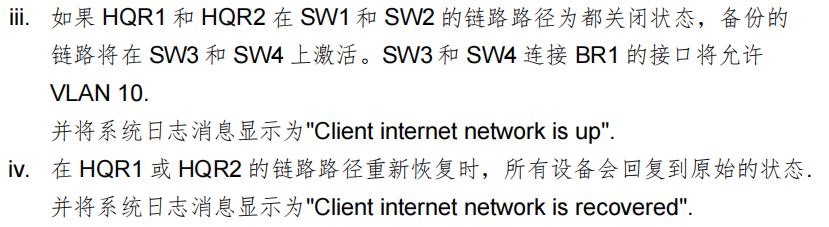
# 可以使用 track 10 list boolean .. 来调用多个 sla
track 10 list boolean and    //当任意一个接口关闭时就会DOWN,只有当所有接口都启动时才会UP
track 10 list boolean or    //只有当所有接口关闭时才会DOWN,但是任意一个接口启动时都会UP
## 这里使用 track 10 list boolean or这里选择ping vlan 30 是因为vlan10和vlan20可能会因为vlan的禁用而导致无法ping通以至于EEM出问题
# Sw3、Sw4(相同配置):

## 配置 sla 和 track:
ip sla 1
 icmp-echo 192.168.30.252 source-interface vlan 30
  frequency 5
ip sla 2
 icmp-echo 192.168.30.253 source-interface vlan 30
  frequency 5
  exit
ip sla schedule 1 life forever start-time now
ip sla schedule 2 life forever start-time now

track 1 ip sla 1 reachability
 exit
track 2 ip sla 2 reachability
 exit

track 10 list boolean or
 object 1    //调用track 1
 object 2    //调用track 2
 exit

## 配置 EEM:
event manager applet CLIENT_UP

 event syslog pattern "10 list boolean or Up -> Down"

 action 1 cli command "enable"

 action 2 cli command "conf t"

 action 4 cli command "interface gigabitEthernet 0/1"

 action 5 cli command "sw tr al vl all"

 action 7 cli command "end"

 action 8 syslog msg "Client internet network is up"

event manager applet RECOVERED

 event syslog pattern "10 list boolean or Down -> Up"

 action 1 cli command "enable"

 action 2 cli command "conf t"

 action 4 cli command "interface gigabitEthernet 0/1"

 action 5 cli command "switchport trunk allowed vlan 1-9,11-4094"

 action 7 cli command "end"

 action 8 syslog msg "Client internet network is recovered"
3、Sw3、Sw4上禁用vlan 20:
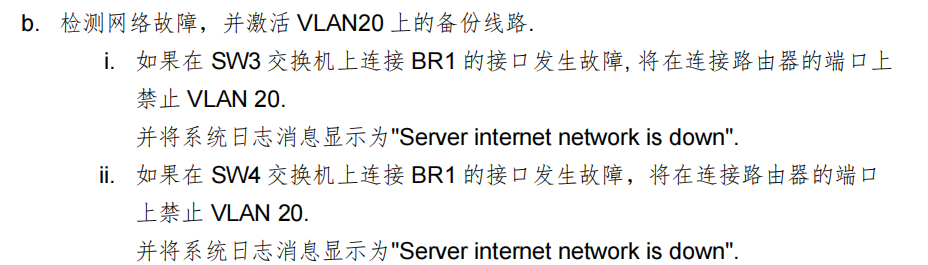

# Sw3、Sw4:
track 10 interface GigabitEthernet0/1 line-protocol

event manager applet VLAN10_UP

 event syslog pattern "3 list boolean or Up -> Down"

 action 1 cli command "enable"

 action 2 cli command "conf t"

 action 3 cli command "int g0/1"

 action 4 cli command "sw tr al vl 1-4094"

 action 5 cli command "end"

 action 6 syslog msg "Client internet network is up"

event manager applet VLAN10_RE

 event syslog pattern "3 list boolean or Down -> Up"

 action 1 cli command "enable"

 action 2 cli command "conf t"

 action 3 cli command "int g0/1"

 action 4 cli command "sw tr al vl 1-9,11-4094"

 action 5 cli command "end"

 action 6 syslog msg "Client internet network is recovered"
4、当BR1 down时 Sw1、Sw2 上放行vlan20:
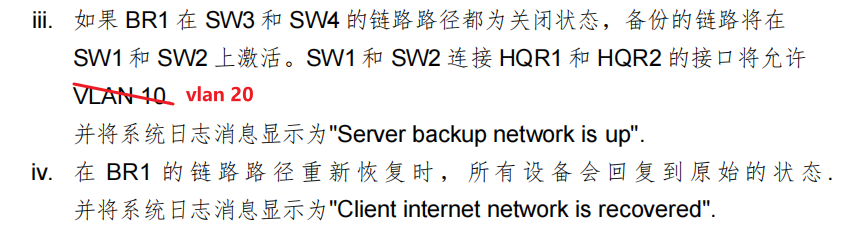
思路:Sw3、Sw4上各自配置一个loop 0接口,Sw1、Sw2上配置静态路由来跟它通信。
Sw3、Sw4上检测 BR1的链路,当BR1链路down时,就将本地的 Loop0接口down掉,Sw1和Sw2使用sla icmp-echo 检测 Sw3和Sw4上的Loop 0接口,当它Down时,Sw1和Sw2就放行 Vlan 20
## Sw3:
int loop 0
 ip add 1.1.1.1 255.255.255.255

## Sw4:
int loop 0
 ip add 2.2.2.2 255.255.255.255

# Sw3、Sw4:
track 10 interface GigabitEthernet0/1 line-protocol

event manager applet LOOP_DOWN

 event syslog pattern "10 interface Gi0/1 line-protocol Up -> Down"

 action 1 cli command "enable"

 action 2 cli command "conf t"

 action 3 cli command "int loop 0"

 action 4 cli command "shutdown"

 action 5 cli command "end"

event manager applet LOOP_RE

 event syslog pattern "10 interface Gi0/1 line-protocol Down -> Up"

 action 1 cli command "enable"

 action 2 cli command "conf t"

 action 3 cli command "int loop 0"

 action 4 cli command "no shutdown"

 action 5 cli command "end"

# Sw1、Sw2:
ip route 1.1.1.1 255.255.255.255 192.168.30.3
ip route 2.2.2.2 255.255.255.255 192.168.30.4

ip sla 1

 icmp-echo 1.1.1.1

 frequency 5

ip sla schedule 1 life forever start-time now

ip sla 2

 icmp-echo 2.2.2.2

 frequency 5

ip sla schedule 2 life forever start-time now

track 1 ip sla 1 reachability

track 2 ip sla 2 reachability

track 3 list boolean or

 object 1

 object 2

event manager applet VLAN20_UP

 event syslog pattern "3 list boolean or Up -> Down"

 action 1 cli command "enable"

 action 2 cli command "conf t"

 action 3 cli command "int g1/1"

 action 4 cli command "sw tr al vl 1-4094"

 action 5 cli command "end"

 action 6 syslog msg "Server backup network is up"

event manager applet VLAN20_RE

 event syslog pattern "3 list boolean or Down -> Up"

 action 1 cli command "enable"

 action 2 cli command "conf t"

 action 3 cli command "int g1/1"

 action 4 cli command "sw tr al vl 1-19,21-4094"

 action 5 cli command "end"

 action 6 syslog msg "Client internet network is recovered"
5、如果HQ1和HQ2之间的链路故障,HQ1将关闭G0/1接口:
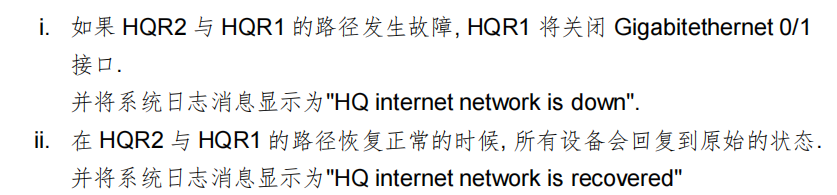
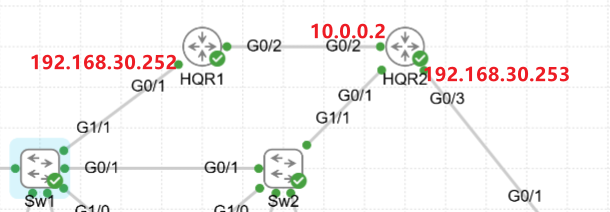
当G0/1接口shutdown时,sla、track就无法检测它和对端的状态了,所以需要使用sla去检测对端接口IP的状态(需要配置一个静态路由指向HQ2)
配置一个静态路由,去往10.0.0.0/30的路由下一跳为192.168.30.253
当g0/1接口没有shutdown时,g0/1的直连路由优先于10.0.0.0/30静态路由,静态路由就不会生效
当g0/1接口shutdown时,这条直连路由会消失,10.0.0.0/30的静态路由就会生效
(这里配置EEM接口down时配置静态路由,接口UP时删除静态路由)
# HQR1:
ip sla 1

 icmp-echo 10.0.0.2

 frequency 5

ip sla schedule 1 life forever start-time now

event manager applet HQ_DOWN

 event syslog pattern "1 ip sla 1 reachability Up -> Down"

 action 1 cli command "enable"

 action 2 cli command "conf t"

 action 3 cli command "int g0/2"

 action 4 cli command "shutdown"

 action 5 cli command "exit"

 action 6 cli command "ip route 10.0.0.0 255.255.255.252 192.168.30.253"

 action 7 cli command "end"

 action 8 syslog msg "HQ internet network is down"

event manager applet HQ_RE

 event syslog pattern "1 ip sla 1 reachability Down -> Up"

 action 1 cli command "enable"

 action 2 cli command "conf t"

 action 3 cli command "int g0/2"

 action 4 cli command "no shutdown"

 action 5 cli command "exit"

 action 6 wait 3

 action 7 cli command "no ip route 10.0.0.0 255.255.255.252 192.168.30.253"

 action 8 cli command "end"

action 9 syslog msg "HQ internet network is recovered"在配置recovered时,需要先等待接口UP了,再删除静态路由,否则可能会导致接口还没有up,但是没有路由去往对端,ip sla icmp 检测失败,导致EEM再次DOWN,然后一直循环UP、DOWN