IPv6 VPN 配置 合集.note
这里只配置 VPN 隧道,如果要配置 IPsec 加密,那么在VPN隧道配置完成后 直接添加上即可。
一、配置 IPv6 VPN(环境:内网 IPv6,公网 IPv4):
IPv6的 GRE VPN、IPv6IP VPN 都只能应用于点对点
而 IPv6 Auto6to4 却能够应用于 点对多点
·环境:
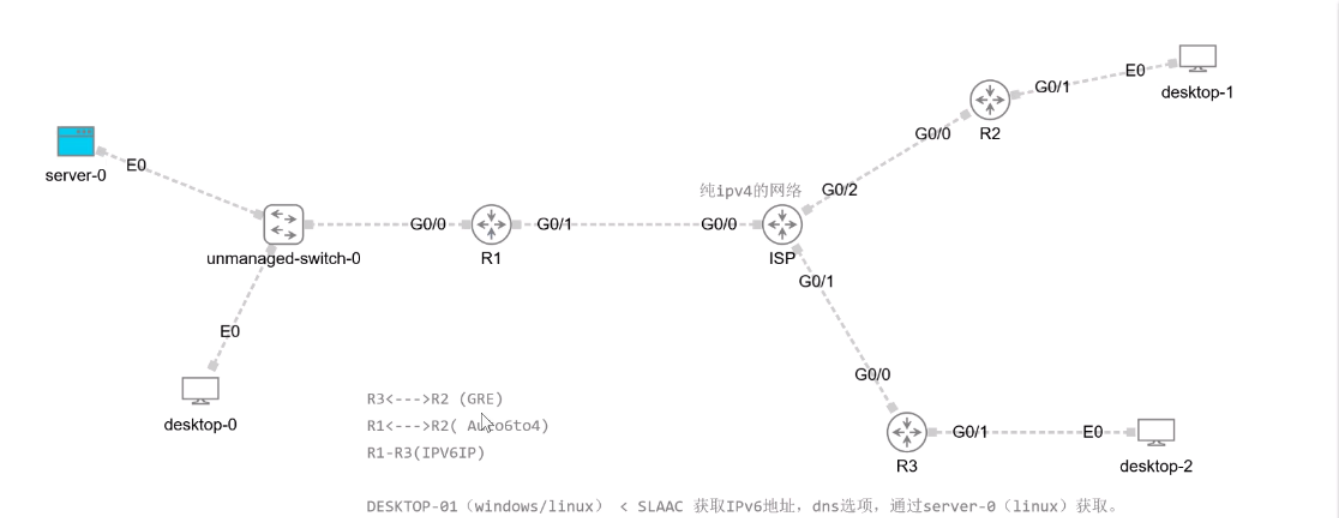
首先保障 公网 ISP 全节点互通
1、IPv6 GRE隧道(R3 和 R2 上 配置 ):
Tunnel模式使用默认的 gre ip
(1)R2:
R2(config)#ipv6 unicast-routing
R2(config)#interface tunnel 0
R2(config-if)#ipv6 enable
R2(config-if)#ipv6 address 2000:1000::1/64
R2(config-if)#tunnel source G0/0
R2(config-if)#tunnel destination 3.3.3.1    //指定 R3的公网接口地址
(2)R3:
R3(config)#ipv6 unicast-routing
R3(config-if)#int tunn 0
R3(config-if)#ipv6 enable
R3(config-if)#ipv6 address 2000:1000::2/64
R3(config-if)#tunnel source G0/0
R3(config-if)#tunnel destination 2.2.2.1    //指定 R2的公网接口地址
(3)指定对方内网网段的路由:
# R2:
R2(config)#ipv6 route 2000:2::/64 tunnel 0

# R3:
R3(config)#ipv6 route 2000:1::/64 tunnel 0
(4)测试访问:
# R2客户端 访问 R3客户端: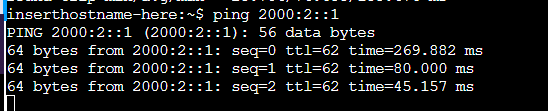
访问成功
2、IPv6IP VPN隧道:
这个隧道与前面的 IPv6 GRE 隧道配置相同,只是多了一条:tunnel mode ipv6ip
(1)R1:
R1(config)#ipv6 unicast-routing
R1(config)#interface tunnel 2
R1(config-if)#ipv6 enable
R1(config-if)#ipv6 address 2000:2000::1/64
R1(config-if)#tunnel source G0/1
R1(config-if)#tunnel destination 3.3.3.1    //指定 R3的公网接口地址
R1(config-if)#tunnel mode ipv6ip
(2)R3:
R3(config)#ipv6 unicast-routing
R3(config-if)#int tunnel 2
R3(config-if)#ipv6 enable
R3(config-if)#ipv6 address 2000:2000::2/64
R3(config-if)#tunnel source G0/0
R3(config-if)#tunnel destination 1.1.1.1    //指定 R1的公网接口地址
R3(config-if)#tunnel mode ipv6ip
(3)将通向对端内网的路由指向 tunnel 隧道:
# R1:
ipv6 route 2000:2::/64 tunnel 2

# R3:
ipv6 route 2000:abcd:abcd:1000::/64 tunnel 2
(4)测试:
# R3 客户端 ping R1 客户端:
3、IPv6 auto6to4 VPN 隧道:
·注意:IPv6 auto6to4 隧道的标准前缀是 2002::/16
(1)R1:
公网 IPv4 地址:1.1.1.1 /这个地址需要转换为16进制写入到 Tunnel 接口中
转换为 16进制就是 0101:0101
R1(config)#ipv6 unicast-routing
R1(config)#interface tunnel 3
R1(config-if)#ipv6 enable
R1(config-if)#ipv6 address 2002:0101:0101::1/64
R1(config-if)#tunnel source G0/1
R1(config-if)#tunnel mode ipv6ip 6to4
R1(config-if)#exit

# 必须配置一条指向对端公网接口的路由:
R1(config)#ipv6 route 2002::/16 tunnel 3
R2(config)#ipv6 route 2002::/16 tunnel 3
(2)R2:
公网 IPv4 地址:2.2.2.1 //这个地址需要转换为16进制写入到 Tunnel 接口中
转换为 16进制就是 0202:0201
R2(config)#int tunn 3
R2(config-if)#ipv6 enable
R2(config-if)#ipv6 address 2002:0202:0201::1/64
R2(config-if)#tunnel source G0/0
R2(config-if)#tunnel mode ipv6ip 6to4
R2(config-if)#exit

# 去往对端公网接口的路由:
R2(config)#ipv6 route 2002::/16 tunnel 3
(3)配置 去往对端内网地址的路由:
# R1:
ipv6 route 2000:1::/64 2002:0202:0201::1

# R2:
ipv6 route 2000:abcd:abcd:1000::/64 2002:0101:0101::1
(4)测试:
# R2 客户端上 ping R1 内网客户端:
4、IPv6 6rd 隧道:
6to4隧道的拓展版本
1、使用IPv4公网出接口作为隧道源接口:
拓扑:
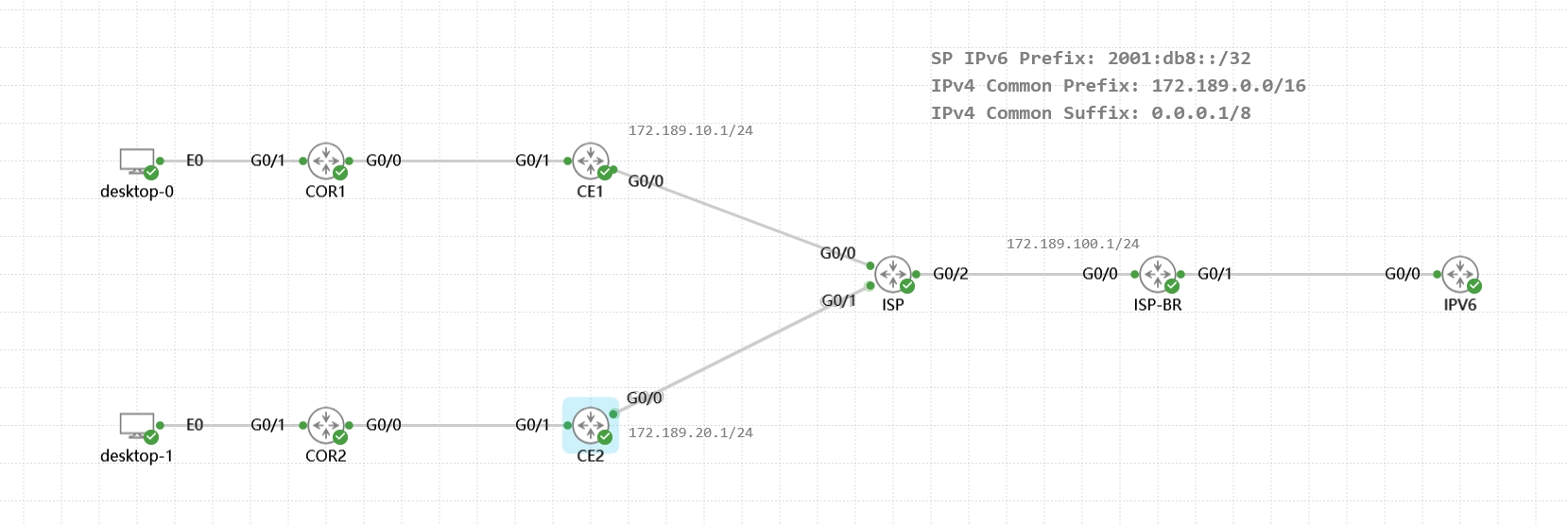
公网IPv4配置EIGRP全网通
(1)配置 6RD BR设备:
# ISP-BR:
ipv6 unicast-routing
ipv6 general-prefix 6RD 6rd tunnel 0

interface Tunnel0
 ipv6 enable
 ipv6 address 6RD ::/128    //定义接口Tunnel IPv6地址(这里可以类似前缀委派一样指定IPv6 IP地址)
 tunnel source GigabitEthernet0/0
 tunnel mode ipv6ip 6rd
 tunnel 6rd ipv4 prefix-len 16 suffix-len 8    //使用 prefix-len排除公网IPv4接口地址前16个bit(因为这里前两位一样,都是 172.189),使用suffix-len排除公网IPv4接口地址后8个bit(因为这里公网地址最后都是 1)
 tunnel 6rd prefix 2001:DB8::/32
 exit

ipv6 route 2001:db8::/32 tunnel 0    //为 6rd前缀配置路由,指向tunnel接口
查看地址:
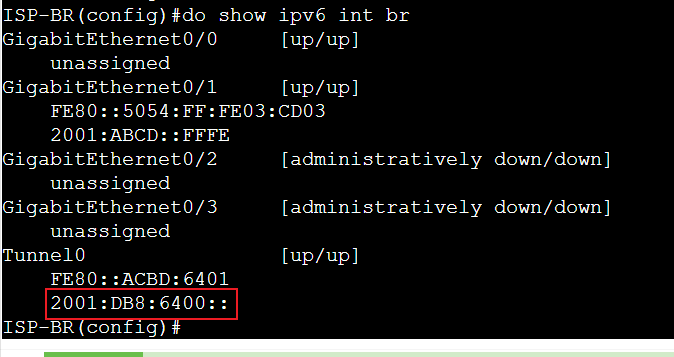
(2)配置 CE设备:
# CE1:
ipv6 unicast-routing
ipv6 general-prefix 6RD 6rd tunnel 0

interface Tunnel0
 ipv6 enable
 ipv6 address 6RD ::/128    //定义接口Tunnel IPv6地址(这里可以类似前缀委派一样指定IPv6 IP地址)
 tunnel source GigabitEthernet0/1
 tunnel mode ipv6ip 6rd
 tunnel 6rd ipv4 prefix-len 16 suffix-len 8
 tunnel 6rd prefix 2001:DB8::/32
 tunnel 6rd br 172.189.100.1    //这个br的地址必须符合上面 ipv4 prefix-len... 定义的匹配规则(这里定义的是:前16位bit、后8位bit相同,因此中间第三等份的8位bit可以不同)
 exit

ipv6 route 2001:db8::/32 tunnel 0
ipv6 route ::/0 tunnel 0 2001:db8:6400::    //默认路由这里必须要指定 br设备的 tunnel接口IPv6地址,才能通信,因为tunnel隧道不是点对点网络,如果不指定地址,那么设备不知道要将默认路由下一跳发给谁,CE2?还是ISP-BR? 因此,这里需要指定一个固定的IPv6地址(并且这里必须是br的地址),否则该条目不会生效
查看地址、ping测试:
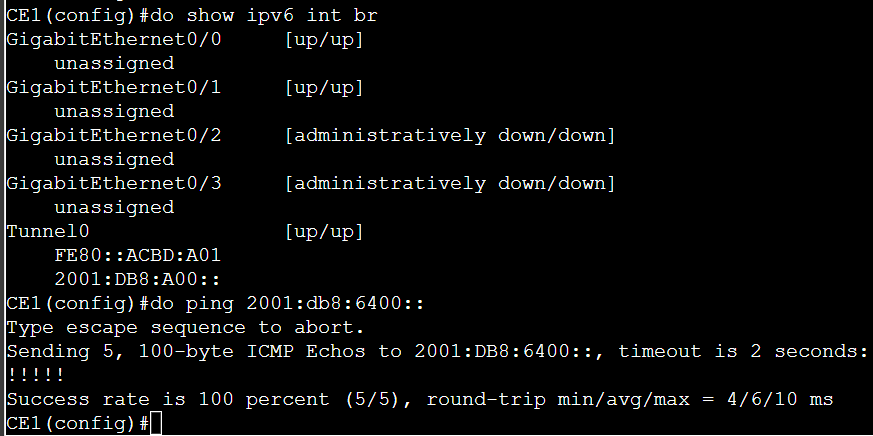
然后可以根据这个地址,为内部主机分配IP,但是不能够超过该网段范围,例如,这里是 2001:db8:a00::/64,那么可分配网段范围就是:
起始:2001:db8:a00:0000::/64
结束:2001:db8:aff:ffff::/64
# 能够ping通6rd域外的IPv6地址是因为这两条关键命令:
tunnel 6rd br 172.189.100.1    //指定6rd br的位置
ipv6 route ::/0 tunnel 0 2001:db8:6400::    //配置IPv6默认路由

## 如果仅访问域内(指定的前缀:2001:db8::/32网段)网络的话(例如CE1、CE2、ISP-BR,或者其他任何路由可达的2001:db8::/32网段),是用不到这两条命令的。
(3)配置 CE设备:
# CE2:
ipv6 unicast-routing
ipv6 general-prefix 6RD 6rd tunnel 0

interface Tunnel0
 ipv6 enable
 ipv6 address 6RD ::/128
 tunnel source GigabitEthernet0/1
 tunnel mode ipv6ip 6rd
 tunnel 6rd ipv4 prefix-len 16 suffix-len 8
 tunnel 6rd prefix 2001:DB8::/32
 tunnel 6rd br 172.189.100.1
 exit

ipv6 route 2001:db8::/32 tunnel 0
ipv6 route ::/0 tunnel 0 2001:db8:6400::
查看地址、ping测试:
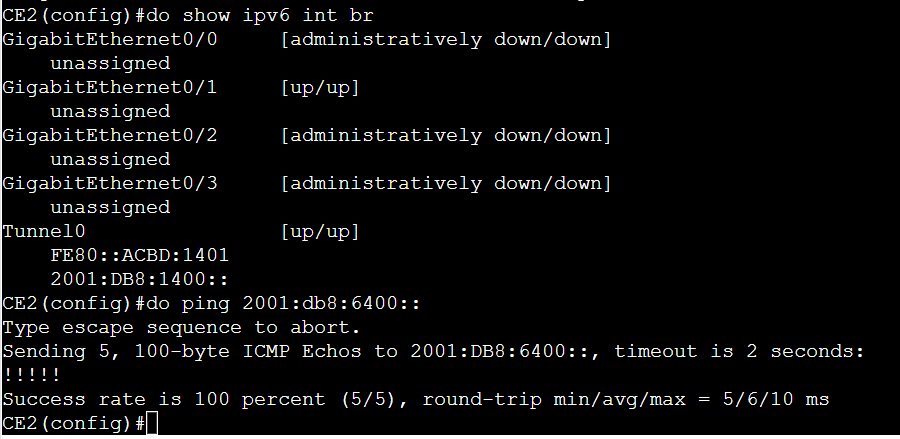
# 与上面一样,该网段可分配范围:
起始:2001:db8:1400:0000::/64
结束:2001:db8:14ff:ffff::/64
2、使用Loopback地址作为隧道源接口:
拓扑:
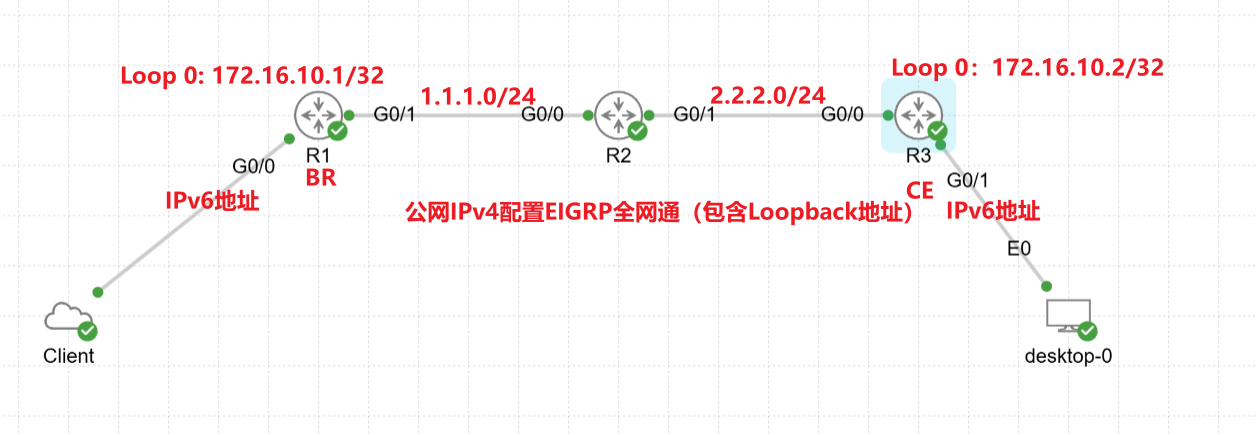
# Tunnel隧道地址可以通过手动计算来指定,也可以通过配置,使Cisco设备根据 指定前缀、IPv4前缀进行自动计算隧道地址(1)R1:
int loop 0
 no sh
 ip add 172.16.10.1 255.255.255.255

ipv6 general-prefix 6RD 6rd Tunnel0

interface Tunnel0
 no ip redirects
 ipv6 address 6RD ::/128
 ipv6 enable
 tunnel source Loopback0
 tunnel mode ipv6ip 6rd
 tunnel 6rd ipv4 prefix-len 16
 tunnel 6rd prefix 2001:abcd::/32
 exit

ipv6 route 2001:abcd::/32 Tunnel 0
查看隧道地址:
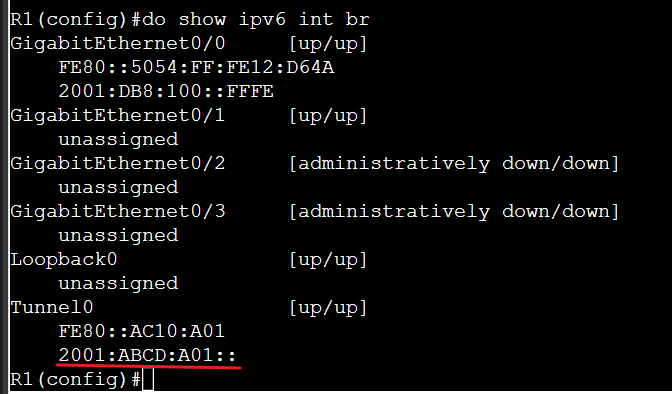
(2)R3:
int loop 0
 no sh
 ip add 172.16.10.2 255.255.255.255

 ipv6 enable
 tunnel source Loopback0
 tunnel mode ipv6ip 6rd
 tunnel 6rd ipv4 prefix-len 16
 tunnel 6rd prefix 2001:abcd::/32
 tunnel 6rd br 172.16.10.1
 exit

ipv6 route 2001:abcd::/32 Tunnel 0
ipv6 route ::/0 tunnel 0 2001:abcd
查看隧道地址:
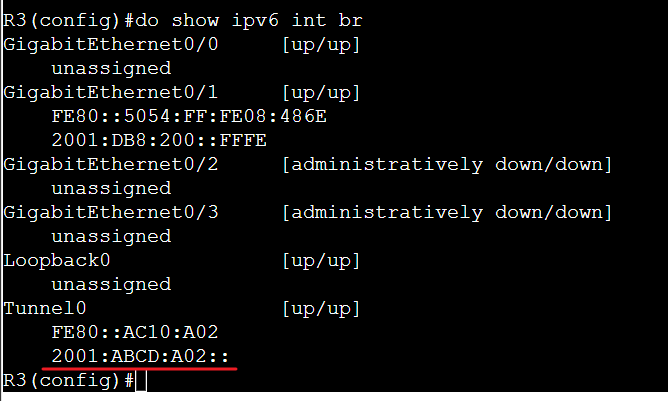
·测试:
R1 ping R3:
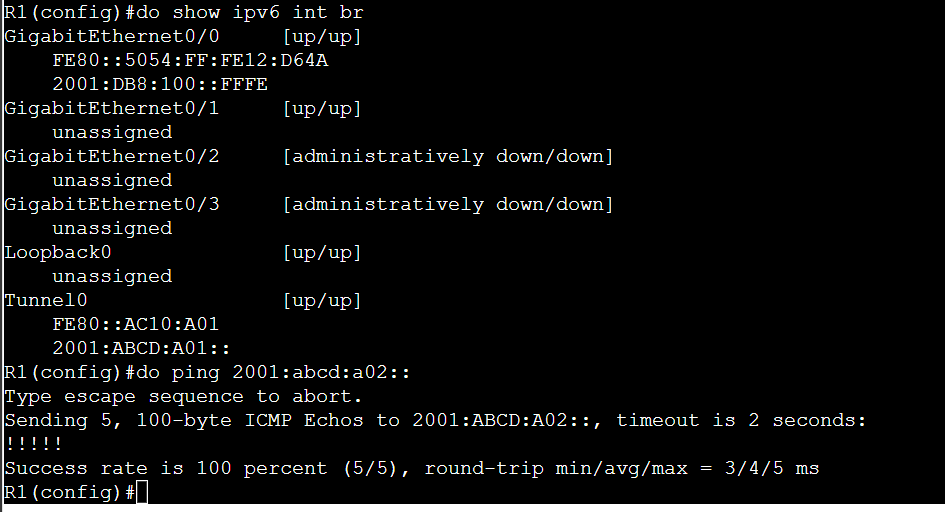
R3 ping R1:
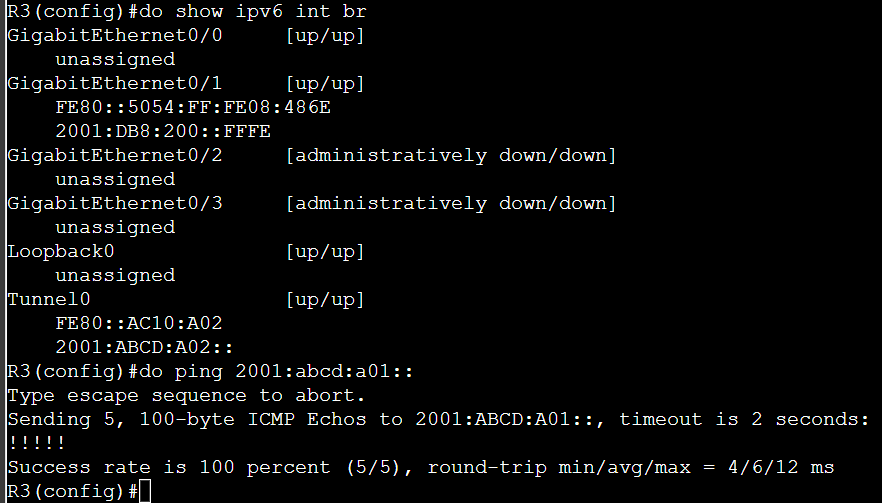
R3 ping 域外地址:

二、配置 isatap(环境:内网IPv4,公网IPv6):
让纯IPv4客户端能够访问到IPv6网络
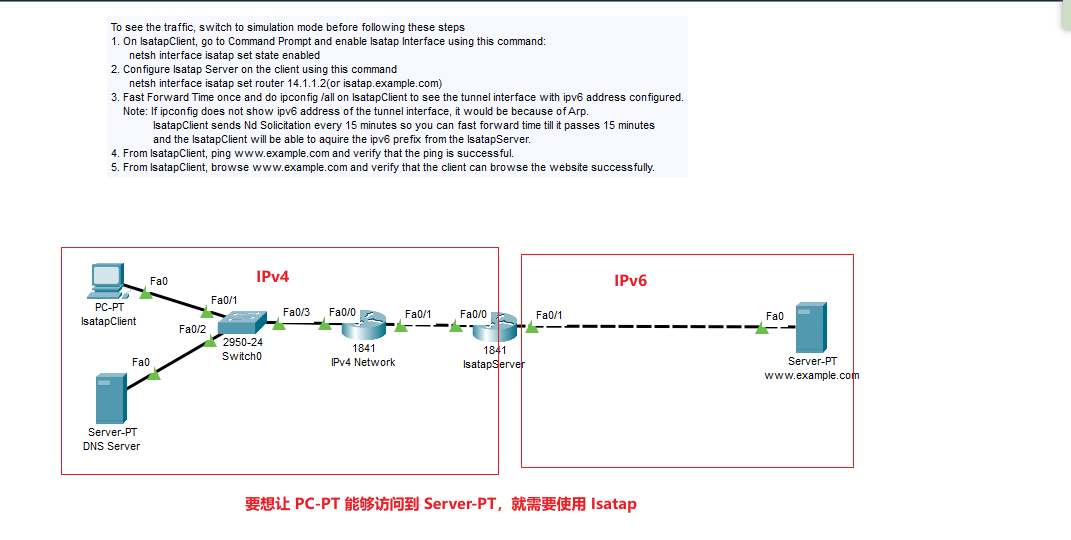
·isatap (给纯IPv4内网客户端提供IPv6地址建立VPN隧道)
应用场景:IPv4内部网络中的几台客户端想要访问外网中的IPv6资源,而又不想将整个网络部署为IPv6环境,那么就需要使用 isatap,在网关路由器上与客户端建立VPN隧道,给客户端分配一个IPv6地址,使其能够访问到IPv6网络。·首先保证连通性没有问题(IPv4 内部网络互通、IPv6 内部网络互通)
(1)配置 Isatap Server:
interface f0/0    //配置内网IPv4接口:
 ip address 14.1.1.2 255.255.255.0
interface f0/1    //配置外网IPv6接口:
 ipv6 address 2001::1/64

interface Tunnel 0    //配置 VPN接口
 ipv6 enable
 ipv6 address 2001:abcd::1    //该地址无需与 IPv6接口地址相同
 tunnel source f0/0    //必须要指定源地址为 内网IPv4接口
 tunnel mode ipv6ip isatap    //设置模式为 isatap
(2)配置 isatap Client:
# Windows、Cisco PT客户端:
netsh interface isatap set state enabled    //启动isatap客户端
netsh interface isatap set router 14.1.1.2    //设置 Isatap 服务器的地址
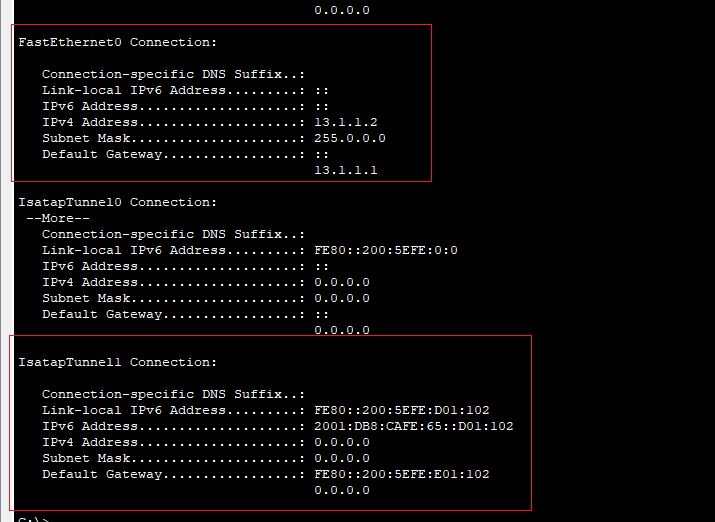
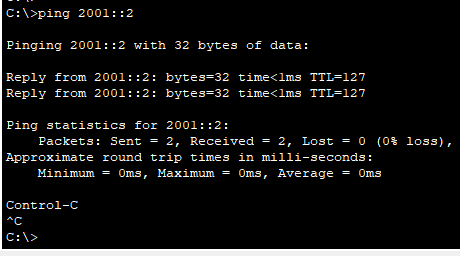
(3)测试访问: