(使用预共享密钥)配置 IKEv2 加密.note
保证公网路由互通是最基础的,不赘述
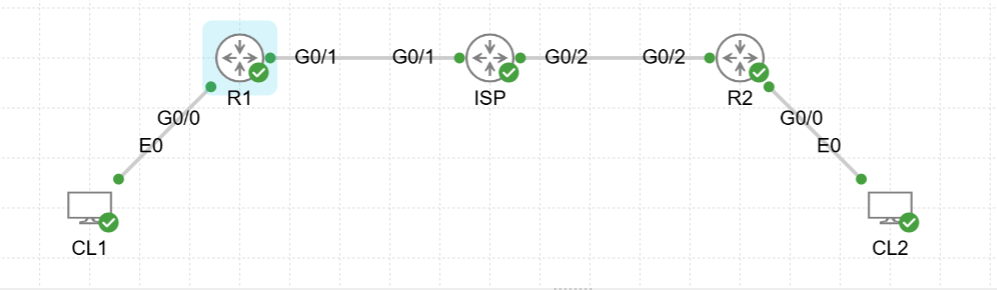
实验拓扑:
一、配置 IKEv2 加密算法:
1、配置 R1:
# 基础配置:
int g0/0    // 配置内网接口
 no sh
 ip add 192.168.1.254 255.255.255.0
 exit

int g0/1    // 配置外网接口
 no sh
 ip add 1.1.1.1 255.255.255.0
 exit

# 配置 IKEv2 第一阶段 proposal:
R1(config)#crypto ikev2 proposal IKEv2
## 算法根据题目要求来就行
R1(config-ikev2-proposal)#encryption aes-cbc-128
R1(config-ikev2-proposal)#integrity sha256 sha384
R1(config-ikev2-proposal)#group 14
R1(config-ikev2-proposal)#exit

# 配置 policy 匹配 proposal:
R1(config)#crypto ikev2 policy POLICY
R1(config-ikev2-policy)#proposal IKEv2
R1(config-ikev2-policy)#exit

# 配置预共享密钥
R1(config)#crypto ikev2 keyring KEY
R1(config-ikev2-keyring)#peer PEER
R1(config-ikev2-keyring-peer)#address 0.0.0.0     // 如果是点对点VPN,就写指定对端公网IP(如果是DMVPN,就写0.0.0.0)
R1(config-ikev2-keyring-peer)#pre-shared-key local Skills39    //指定本地的预共享密钥
R1(config-ikev2-keyring-peer)#pre-shared-key remote Skills39    //指定对端的预共享密钥
R1(config-ikev2-keyring-peer)#exit

# 配置 IKEv2 profile(不是给 tunnel接口 关联的那个profile)
R1(config)#crypto ikev2 profile PROFILE
R1(config-ikev2-profile)#match identity remote address 2.2.2.1    //指定对端公网IP地址
# 或:match identity remote any
R1(config-ikev2-profile)#identity local address 1.1.1.1    //指定本地公网IP地址
# 或:identity local address 0.0.0.0
R1(config-ikev2-profile)#authentication local pre-share     //设置本地使用预共享密钥认证
R1(config-ikev2-profile)#authentication remote pre-share     //指定对端使用预共享密钥认证
R1(config-ikev2-profile)#keyring local KEY    //关联前面创建的KEY
R1(config-ikev2-profile)#exit

# 配置 ipsec 转换集:
R1(config)#crypto ipsec transform-set IPSEC esp-aes 256
R1(cfg-crypto-trans)#mode transport     //如果是 GRE-over-IPSec、ASA-ipsec-tunnel 就需要指定这个模式
R1(cfg-crypto-trans)#exit
## mode tunnel 模式只有在 最基础的IPSec VPN中才需要使用到

# 配置 profile 关联 转换集、IKEv2:
R1(config)#crypto ipsec profile PRO
R1(ipsec-profile)#set transform-set IPSEC
R1(ipsec-profile)#set ikev2-profile PROFILE

# 配置 Tunnel 接口:
## tunnel 接口的配置主要根据你配置的VPN类型来决定
int tunn 0
 tunnel protection ipsec profile PRO
## 这里演示的是 GRE-over-IPSec的配置
 ip address 10.0.0.1 255.255.255.0
 tunnel source g0/1
 tunnel destination 2.2.2.1
 tunnel mode ipsec ipv4
2、配置 R2:
# 基础配置:
int g0/0    // 配置内网接口
 no sh
 ip add 172.16.1.254 255.255.255.0
 exit

int g0/2    // 配置外网接口
 no sh
 ip add 2.2.2.1 255.255.255.0
 exit


R2(config)#crypto ikev2 proposal IKEv2
R2(config-ikev2-proposal)#encryption aes-cbc-128
R2(config-ikev2-proposal)#integrity sha256 sha384
R2(config-ikev2-proposal)#group 14

R2(config)#crypto ikev2 policy POLICY
R2(config-ikev2-policy)#proposal IKEv2

R2(config)#crypto ikev2 keyring KEY
R2(config-ikev2-keyring)#peer PEER
R2(config-ikev2-keyring-peer)#address 0.0.0.0
R2(config-ikev2-keyring-peer)#pre-shared-key local Skills39
R2(config-ikev2-keyring-peer)#pre-shared-key remote Skills39

R2(config)#crypto ikev2 profile PROFILE
R2(config-ikev2-profile)#match identity remote address 1.1.1.1
R2(config-ikev2-profile)#identity local address 2.2.2.1
R2(config-ikev2-profile)#authentication local pre-share
R2(config-ikev2-profile)#authentication remote pre-share
R2(config-ikev2-profile)#keyring local KEY

R2(config)#crypto ipsec transform-set IPSEC esp-aes 256
R2(cfg-crypto-trans)#mode transport

R2(config)#crypto ipsec profile PRO
R2(ipsec-profile)#set transform-set IPSEC
R2(ipsec-profile)#set ikev2-profile PROFILE

int tunn 0
 tunnel protection ipsec profile PRO
 ip address 10.0.0.2 255.255.255.0
 tunnel source g0/2
 tunnel destionation 1.1.1.1
 tunel mode ipsec ipv4
·查看 IKEv2 sa 建立状况:
show crypto ikev2 sa
show crypto ipsec sa count