C模块.note
一、NTP:
# 服务器使用 ntp master 3 //这样ntp客户端连接就不容易掉二、路由器高可用:
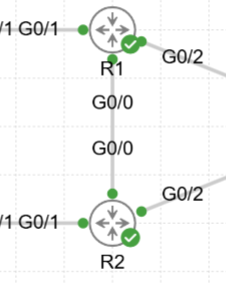
# R1:
## 在outside接口设置冗余组ID,启用非对称路由
int g0/2
 no sh
 ip add 11.11.11.1 255.255.255.0
 ip nat outside
 redundancy rii 1    //这个 id需要跟后面定义的冗余组id相同
 redundancy asymmetric-routing enable

## 开启数据接口,并设置IP地址:
int g0/0
 no sh
 ip add 100.0.0.1 255.255.255.0

## 配置 inside接口:
int g0/1
 no sh
 ip address 192.168.10.252 255.255.255.0
 ip nat inside


# R2:
## 在outside接口设置冗余组ID,启用非对称路由
int g0/2
 no sh
 ip add 22.22.22.1 255.255.255.0
 ip nat outside
 redundancy rii 1    //这个 id需要跟后面定义的冗余组id相同
 redundancy asymmetric-routing enable

## 开启数据接口,并设置IP地址:
int g0/0
 no sh
 ip add 100.0.0.2 255.255.255.0

## 配置 inside接口:
int g0/1
 no sh
 ip address 192.168.10.253 255.255.255.0
 ip nat inside


# 在主设备上配置 sla检测:
## 最好先配置好IP地址,让它能够ping通
ip sla 1
 icmp-echo 11.11.11.254 source-interface g0/2
  frequency 5
exit

ip sla schedule 1 life forever start-time now
track 1 ip sla 1

# R1配置高可用:
redundancy

 application redundancy

  group 1

   name FAILOVER
   asymmetric-routing interface GigabitEthernet0/0

   asymmetric-routing always-divert enable


   control GigabitEthernet0/0 protocol 1

   data GigabitEthernet0/0

   preempt

   priority 255 failover threshold 150

   track 1 decrement 150
   shutdown
   no shutdown

# R2配置高可用:
redundancy

 application redundancy

  group 1

   name FAILOVER
   asymmetric-routing interface GigabitEthernet0/0

   asymmetric-routing always-divert enable


   control GigabitEthernet0/0 protocol 1

   data GigabitEthernet0/0

   preempt

   priority 200 failover threshold 150
   shutdown
   no shutdown

# 配置 nat(R1、R2的NAT配置需要相同):
ip nat pool POOL 123.1.1.1 123.1.1.1 netmask 255.255.255.254    //掩码不能够是255
ip access-list extended NAT
 permit ip 192.168.10.0 0.0.0.255 any
ip nat inside source list NAT pool POOL redundancy 1 mapping-id 1 overload
查看状态:
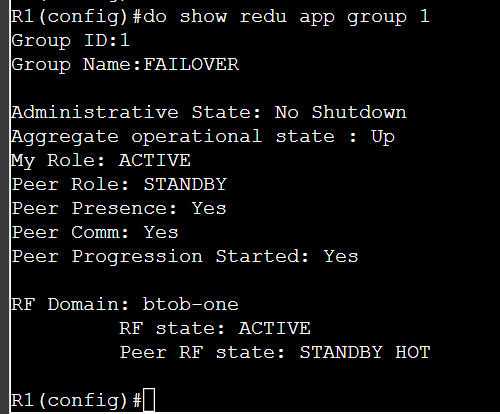
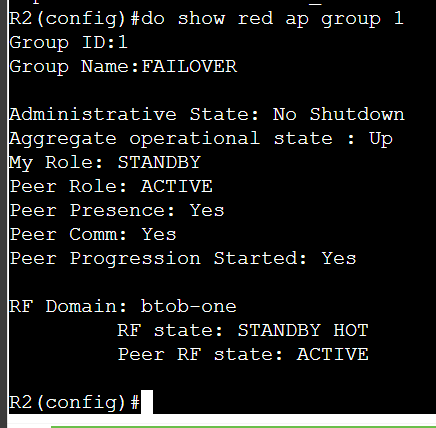
三、trunk 动态协商:
# 注意:进行trunk协商的接口两端都不能够配置 switchport nonegotiate
## 主动发起trunk协商:
int g0/0
 no shut
 sw tr en do
 switchport mode dynamic desirable

## 被动响应trunk协商:
int g0/0
 no shut
 sw tr en do
 switchport mode dynamic auto
查看:
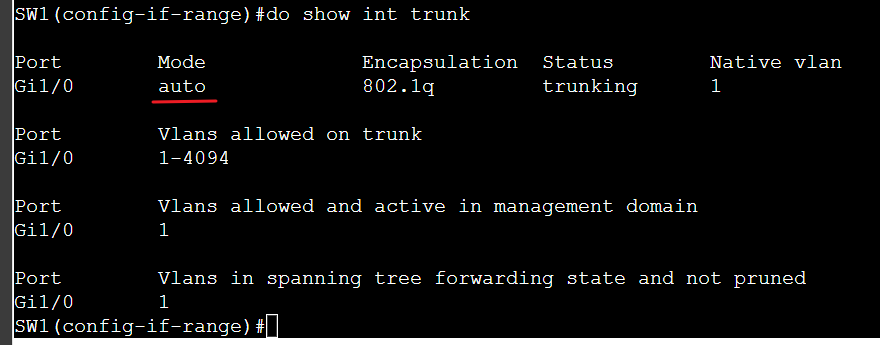
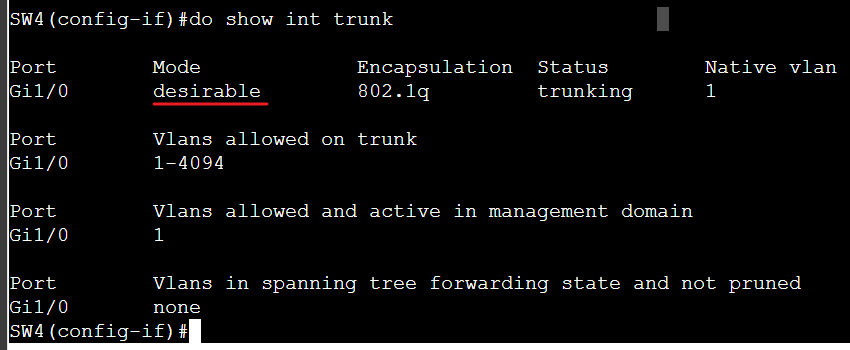
如果是直接 sw mo tr 开启的,会显示为 on
四、配置接口带宽、延迟:
int g0/0
# 修改带宽:
 bandwidth 10000000
# 修改延迟:
## 如果要设置500,这里就需要配置50
 delay 50

## 使用 show int g0/1 命令查看
五、PPPoE(ASA为客户端):
在ASA上配置chap认证
# 服务端:
## 创建 chap 认证所需要的用户(注意密码不能够有加密):
username ASA password Skills39

ip local pool POOL 5.5.5.1
bba-group pppoe global
 virtual-template 1
int virtual-template 1
 ip unnumbered gigabitEthernet 0/4
 peer default ip address pool POOL
 ppp authentication chap

int g0/4
 no sh
 ip address 5.5.5.254 255.255.255.0
 pppoe enable group global


# 客户端(ASA):
## 先放行acl、放行policy-map icmp
## pppoe接口一定需要配置nameif,否则无法获取到地址
vpdn group pppoe_name ppp authentication chap
vpdn group pppoe_name localname ASA
vpdn group pppoe_name request dialout pppoe    //需要配置这个才会生效
vpdn username ASA password Skills39

int g0/1
 no shut
 nameif Outside
 pppoe client vpdn group pppoe_name
 ip address pppoe setroute    //获取pppoe IP,并自动下发一条路由

route outside 44.44.44.0 255.255.255.0 44.44.44.254    //有时可能没有下发路由,所以需要配置一条路由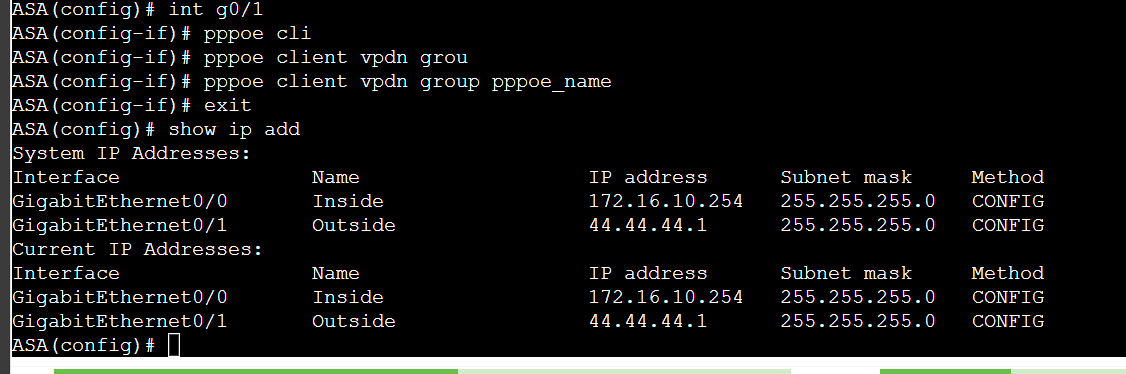
六、dmvpn 端口映射:
# ASA 只需要映射
object network DMVPN

 host 172.16.10.1
 nat (Inside,Outside) static 44.44.44.2
# 不能转换成接口IP地址,否则ssl vpn 无法连接上,转换成另外一个IP即可
七、radius:
1、radius 服务器:
apt install -y freeradius
cd /etc/freeradius/3.0

vim clients.conf
## 定义允许客户端访问的地址: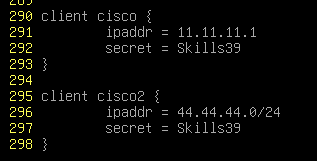
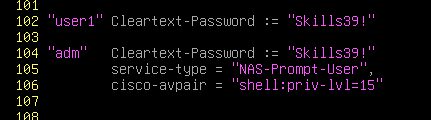
# 定义用户:
vim users
## 在 /usr/share/freeradius/ 中可以查询到部分(只有 shell:priv-lvl=15需要背)
2、路由器客户端:
radius server RADIUS
 address ipv4 55.55.55.1  auth-port 1812 acct-port 1813
 key Skills39

aaa new-model
aaa authentication login AAA group radius local
aaa authorization exec AAA group radius local
aaa authorization console

# 本地登陆:
lin con 0
 login authentication AAA
 authorization exec AAA

# ssh登陆:
crypto key generate rsa label ssh.key modulus 2048
ip ssh version 2
lin vty 0 530
 transport input ssh
 login authentication AAA
 authorization exec AAA
3、ASA客户端:
aaa-server RADIUS protocol radius
aaa-server RADIUS (Outside) host 55.55.55.1    //必须要定义出接口
 authentication-port 1812
 accounting-port 1813
 key Skills39

# 本地认证:
aaa authentication serial console RADIUS LOCAL

# ssh认证:
## ASA需要有域名才能够生成私钥
domain-name cisco.com
crypto key generate rsa label ssh.key modulus 2048
aaa authentication ssh console RADIUS LOCAL
ssh 0.0.0.0 0.0.0.0 Outside
ssh 0.0.0.0 0.0.0.0 Inside
八、OSPFv3配置BFD检测:
ipv6 un
router ospfv3 1    //启动进程

int g0/1
 ipv6 enable
 ospfv3 1 ipv6 area 0    //通告接口
# pfd检测:
## 在单个接口中配置(两端都配置):
int g0/1
ospfv3 bfd
bfd interval 50 min_rx 50 multiplier 3
## 全局开启:
router ospfv3 1
add ipv4 un
bfd all-interface
int g0/1
bfd interval 50 min_rx 50 multiplier 3九、前缀列表 匹配 小于或等于 24位的路由:
# 要匹配 /24以及 以下的所有路由:
ip prefix-list all permit 0.0.0.0/0 le 24

# 匹配所有路由:
ip prefix-list all permit 0.0.0.0/0 le 32
十、dns:
ip dns server    //开启dns服务
ip host webvpn.worldskills2025.gd 155.59.3.6    //配置A记录
十一、EIGRP 非等价负载均衡路由:
# 在需要非等价路由的机器上配置:
router eigrp TEST


 address-family ipv4 unicast autonomous-system 1


  topology base

   variance 2

   traffic-share min across-interfaces
十二、密钥链:
key chain KEY

 key 1

   key-string P@ssw0rd

   accept-lifetime 00:00:00 Apr 1 2025 23:59:59 Apr 30 2025

   send-lifetime 00:00:00 Apr 1 2025 23:59:59 Apr 30 2025

   cryptographic-algorithm hmac-sha-256

 key 2

   key-string P@ssw0rd

   accept-lifetime 00:00:00 May 1 2025 infinite

   send-lifetime 00:00:00 May 1 2025 infinite

   cryptographic-algorithm hmac-sha-256
十三、NAT64:
ipv6 un

int g0/0
no sh
ipv6 address 2001:abcd::ffff/64
ipv6 address FE80::FFFF link-local
nat64 enable

int g0/1
no sh
ip address 192.168.1.1    //注意,NAT64是无法ping通本地接口的这个IPv4地址的,只能够ping通其它的
nat64 enable
exit

nat64 prefix stateful 6666:6666::/96    //用不到这个前缀,随意指定一个,让NAT64不报错
nat64 v6v4 static 2001:abcd::123 123.1.1.123    //将 2001:abcd::1 静态转换为 123.1.1.1
十四、IPv6 dhcp 前缀委派:
# 服务器:
ipv6 local pool BRPD 2025:ABCD:3948::/48 48
ipv6 dhcp pool BRPD-P

 prefix-delegation pool BRPD lifetime infinite infinite

# 客户端:
int g0/1
 ipv6 dhcp client pd BRPD
int g0/0
 ipv6 enable
 ipv6 address BRPD ::1:0:0:0:1/64