C模块.note
题目:
一、交换部分
·基础配置:
no ip domain lo
lin con 0
logg s
exec-t 0 0
exit
clock timezone CST 8
enable secret P@ssworD
do wr
1、RSTP(802.1w):
802.1w —— RSTP
802.1s —— MSTP
802.1d —— pvst
# CO_GW1:
spanning-tree mode rapid-pvst
spanning-tree vlan 10,99 priority 0
spanning-tree vlan 20 priority 4096

# CO_GW2:
spanning-tree mode rapid-pvst
spanning-tree vlan 20 priority 0
spanning-tree vlan 10,99 priority 4096

# CO_AC_SW1、CO_AC_SW2、DATA_SW:
spanning-tree mode rapid-pvst
## BO区域:
#BO_GW:
spanning-tree mode rapid-pvst
spanning-tree vlan 10,20 priority 0
# BO_AC_SW1、BO_AC_SW2:
spanning-tree mode rapid-pvst2、VTP:
# CO_GW1:
vtp domain WSC2024.ORG
vtp version 2
vtp password P@ssworD
vtp mode server

# CO_GW2、CO_AC_SW1、CO_AC_SW2:
vtp domain WSC2024.ORG
vtp version 2
vtp password P@ssworD
vtp mode client
3、链路聚合:
# CO_GW1:
interface range GigabitEthernet1/0/3-4
 channel-group 3 mode on

interface range GigabitEthernet1/0/1-2
 channel-group 1 mode desirable

# CO_GW2:
interface range GigabitEthernet1/0/1-2
 channel-group 2 mode active

interface range GigabitEthernet1/0/3-4
 channel-group 3 mode on

# CO_AC_SW1:
interface range FastEthernet0/3-4
 channel-group 1 mode auto

# CO_AC_SW2:
interface range FastEthernet0/3-4
 channel-group 2 mode passive
4、最好再配置 native vlan 和 trunk 修剪
int ra g1/0/5-6
 sw tr al vl 10,20,99
 sw tr na vl 99
5、HSRP:
# CO_GW1:
interface Vlan10
 standby version 2
 standby 10 ip 192.168.10.254
 standby 10 priority 255
 standby 10 preempt

interface Vlan20
 standby version 2
 standby 20 ip 192.168.20.254
 standby 20 priority 200
 standby 20 preempt

interface Vlan99
 standby version 2
 standby 99 ip 192.168.99.254
 standby 99 priority 255
 standby 99 preempt


# CO_GW2:
 standby version 2
 standby 10 ip 192.168.10.254
 standby 10 priority 200
 standby 10 preempt

interface Vlan20
 standby version 2
 standby 20 ip 192.168.20.254
 standby 20 priority 255
 standby 20 preempt

interface Vlan99
 standby version 2
 standby 99 ip 192.168.99.254
 standby 99 priority 200
 standby 99 preempt
6、DHCP
CO_SRV1:
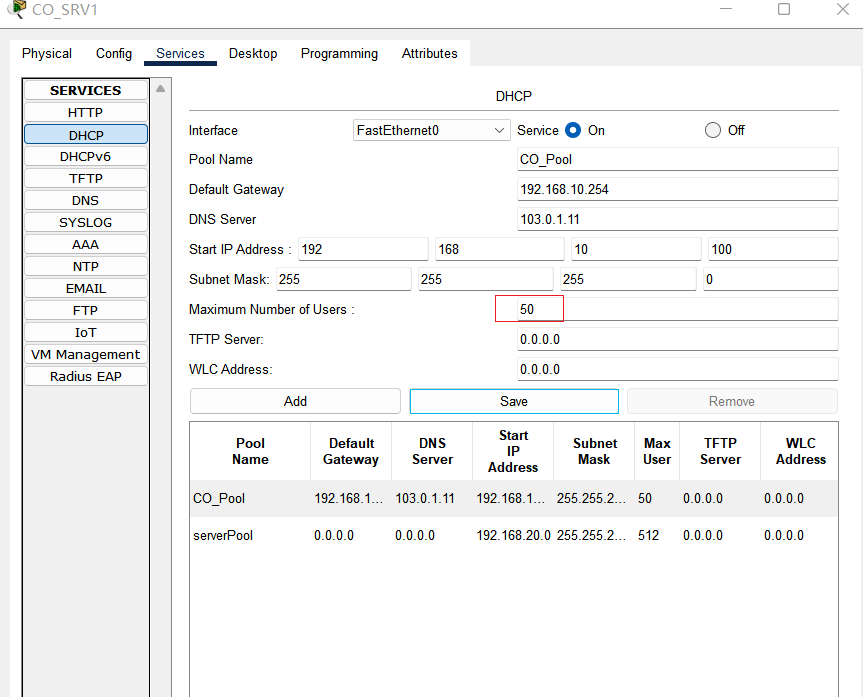
## 前提是有给客户端划分vlan,CO_CLT划分到vlan10,CO_SRV划分到vlan20
# CO_GW1、CO_GW2:
int vlan 10
 ip helper-address 192.168.20.100
7、portfast、bpduguard、端口安全:
# 所有交换机
int f0/1    //连接客户端的接口
spanning-tree portfast

# CO_AC_SW1:
int f0/1
spann bpduguard enable

int f0/2
 switchport port-security
 switchport port-security maximum 1
 switchport port-security mac-address sticky
 switchport port-security violation protect
二、路由部分
1、CO区域内部EIGRP:
## 需要配置被动接口
# CO_GW1:
router eigrp 2024
 no au
 passive-interface default
 no passive-interface GigabitEthernet1/0/6
 network 10.0.1.0 0.0.0.255
 network 192.168.10.0 0.0.0.255
 network 192.168.20.0 0.0.0.255
 network 192.168.99.0 0.0.0.255

# CO_GW2:
router eigrp 2024
 no au
 passive-interface default
 no passive-interface GigabitEthernet1/0/6
 network 10.0.2.0 0.0.0.255
 network 192.168.10.0 0.0.0.255
 network 192.168.20.0 0.0.0.255
 network 192.168.99.0 0.0.0.255

# CO_EDGE:
router eigrp 2024
 no au
 passive-interface default
 no passive-interface GigabitEthernet0/0/0
 no passive-interface GigabitEthernet0/0/1
 network 10.0.1.0 0.0.0.255
 network 10.0.2.0 0.0.0.255
2、BO区域内部RIPv2:
虽然没说,但是最好也配置一个被动接口
# BO_EDGE:
router rip
 version 2
 network 10.0.3.0
 no auto-summary

# BO_GW:
router rip
 version 2
 network 10.0.3.0
 network 172.16.10.0
 network 172.16.20.0
 no auto-summary
3、公网 OSPF:
最好是在接口也启用一个ospf,因为是自动化评分的
 ISP1:
router ospf 2024
 router-id 1.1.1.1
 network 102.14.1.0 0.0.0.3 area 0
 network 101.0.1.0 0.0.0.255 area 1
 network 1.1.1.1 0.0.0.0 area 0

# 将接口类型设置为点对点:
int g0/0/0
 ip ospf network point-to-point
ISP2:
router ospf 2024
router-id 2.2.2.2
network 103.24.1.0 0.0.0.3 area 0
network 102.0.1.0 0.0.0.255 area 2
network 2.2.2.2 0.0.0.0 area 0
int g0/0/0
ip ospf network point-to-pointISP3:
router ospf 2024
router-id 3.3.3.3
network 104.34.1.0 0.0.0.3 area 0
network 103.0.1.0 0.0.0.255 area 3
network 3.3.3.3 0.0.0.0 area 0
int g0/0/0
ip ospf 2024 area 3 //必须要在接口启用ospf,否则ASA将无法获取到路由条目
ip ospf network point-to-pointISP4:
router ospf 2024
router-id 4.4.4.4
network 104.34.1.0 0.0.0.3 area 0
network 103.24.1.0 0.0.0.3 area 0
network 102.14.1.0 0.0.0.3 area 0
network 4.4.4.4 0.0.0.0 area 0 CO_EDGE:
router ospf 2024
router-id 5.5.5.5
network 101.0.1.0 0.0.0.255 area 1
network 5.5.5.5 0.0.0.0 area 1BO_EDGE:
router ospf 2024
router-id 6.6.6.6
network 102.0.1.0 0.0.0.255 area 2
network 6.6.6.6 0.0.0.0 area 2DATAFW:
interface GigabitEthernet1/1
nameif Outside
security-level 0
ip address 103.0.1.1 255.255.255.0
router ospf 2024
router-id 7.7.7.7
network 103.0.1.0 255.255.255.0 area 3三、防火墙部分
1、基础配置:
DATAFW:
## 防火墙如果不用ACL放行流量的话是pin不通的(但是其它流量可以通过),但是本次题目防火墙需要应用其它ACL,无法应用该ACL,因此就不创建了

policy-map global_policy
 class inspection_default
  inspect icmp

interface GigabitEthernet1/1
 nameif Outside
 security-level 0
 ip address 103.0.1.1 255.255.255.0

interface GigabitEthernet1/2
 nameif Inside
 security-level 50
 ip address 172.16.1.254 255.255.255.0
2、配置 ACL:
# 允许外部访问防火墙的这些端口:
access-list DNS_WEB permit udp any host 103.0.1.11 eq 53
access-list DNS_WEB permit tcp any host 103.0.1.20 eq 80
access-group DNS_WEB in interface Outside
3、配置 DNAT:
# 将内网 172.16.1.10地址,映射到公网103.0.1.11:
object network DNS-SRV
 host 172.16.1.10
 nat (Inside,Outside) static 103.0.1.11

# 将内网 172.16.1.20地址,映射到公网103.0.1.20
object network WEB-SRV
 host 172.16.1.20
nat (Inside,Outside) static 103.0.1.20这样直接就能够访问了,不需要配置静态路由然后重分发到 OSPF
四、默认路由、NAT、ACL:
1、默认路由:
(1)CO区域:
# CO_GW1:
ip route 0.0.0.0 0.0.0.0 10.0.1.1

# CO_GW2:
ip route 0.0.0.0 0.0.0.0 10.0.2.1
(2)BO区域:
# BO_GW:
ip route 0.0.0.0 0.0.0.0 10.0.3.1
2、NAT:
(1)CO_EDGE:
int g0/0/2
 ip nat outside
int ra g0/0/0-1
 ip nat inside

ip access-list extended CotoNat
 permit ip 192.168.0.0 0.0.255.255 any

ip nat inside source list CotoNat interface g0/0/2 overload
(2)BO_EDGE:
int g0/0/1
 ip nat inside
int g0/0/0
 ip nat outside

ip access-list extended BotoNat
 permit ip 172.16.0.0 0.0.255.255 any

ip nat inside source list BotoNat interface GigabitEthernet0/0/0 overload
(3)DATAFW(DNAT):
ASA防火墙不需要在接口上配置 nat inside 和 outside
DateFW:
 interface GigabitEthernet1/1
 nameif Outside
 security-level 0
 ip address 103.0.1.1 255.255.255.0

interface GigabitEthernet1/2
 nameif Inside
 security-level 50
 ip address 172.16.1.254 255.255.255.0

 ### 静态DNAT
object network DNS-SRV
 host 172.16.1.10
 nat (Inside,Outside) static 103.0.1.11
object network WEB-SRV
 host 172.16.1.20
 nat (Inside,Outside) static 103.0.1.20

 ### ACL允许流量通过
 access-list DNS_WEB extended permit ip any host 103.0.1.20
 access-list DNS_WEB extended permit ip any host 103.0.1.11
 access-group DNS_WEB in interface Outside
五、服务(dns、web、dhcp):
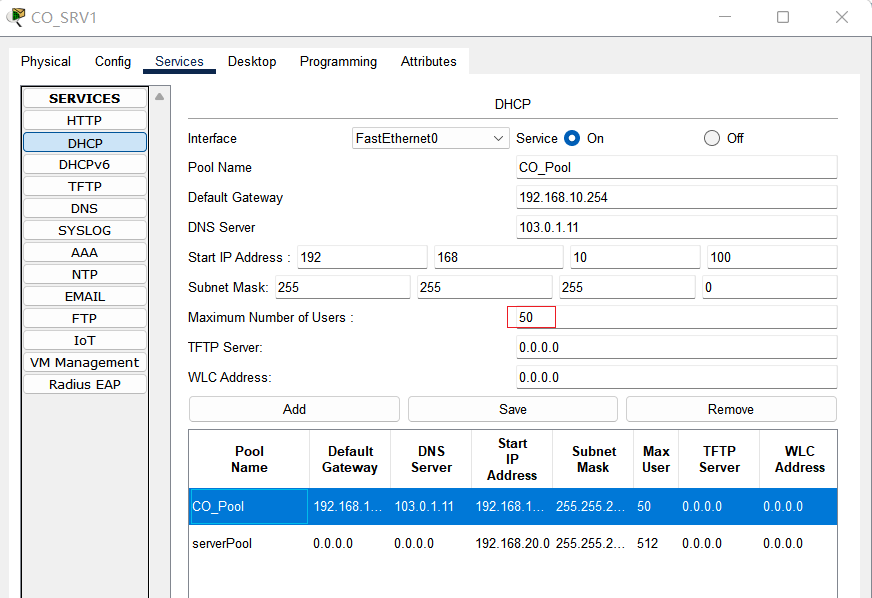
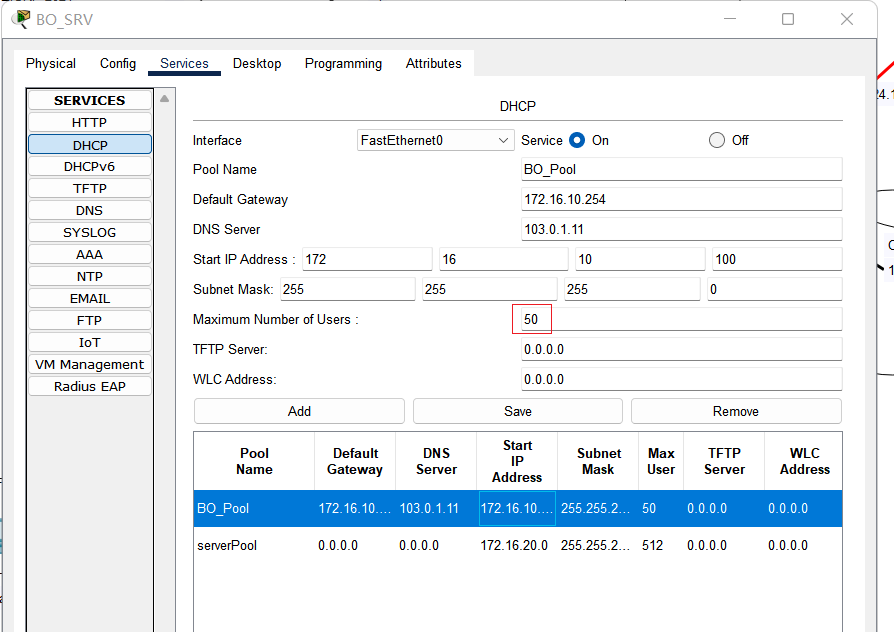
1、dhcp:
(1)CO_SRV1:
(2)BO_SRV:
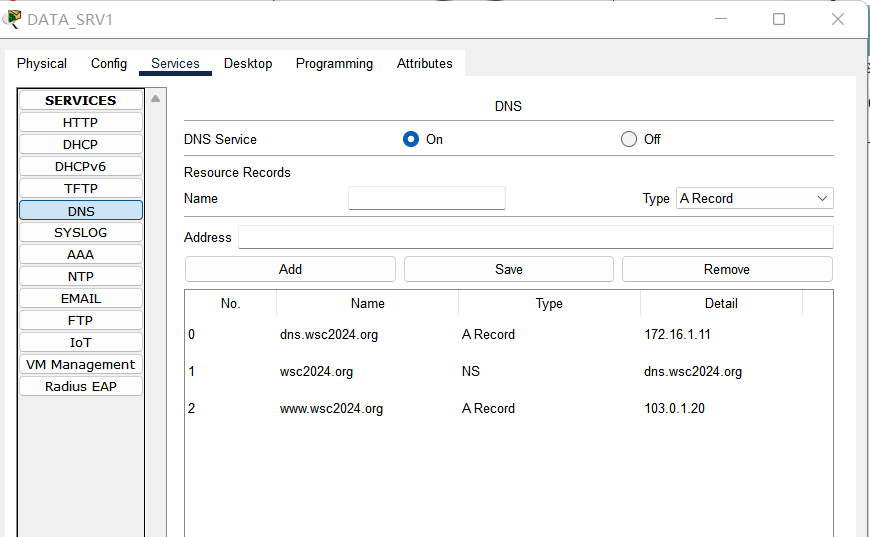
2、DATA_SRV1(DNS):
3、DATA_SRV2(web):
六、VPN部分
1、CO_EDGE 和 BO_EDGE 部分:
(1)先建立GREtunnel,确保GRE能够ping通:
# CO_EDGE:
interface Tunnel 10
 ip address 10.0.0.1 255.255.255.0
 tunnel source G0/0/2
 tunnel destination 102.0.1.1

# BO_EDGE:
interface Tunnel 10
 ip address 10.0.0.2 255.255.255.0
 tunnel source G0/0/0
 tunnel destination 101.0.1.1
(2)配置 IPSec 加密:
·CO_EDGE:
crypto isakmp policy 10
 encr aes 256
 hash sha
 group 1
 authentication pre-share

crypto isakmp key P@ssworD address 0.0.0.0

crypto ipsec transform-set TS esp-3des esp-sha-hmac

ip access-list extended TUNVPN
 permit gre host 101.0.1.1 host 102.0.1.1    //匹配本端到对端公网地址的GRE流量

crypto map CMAP 1 ipsec-isakmp
 set peer 102.0.1.1
 set transform-set TS
 match address TUNVPN

interface GigabitEthernet0/0/2
 crypto map CMAP
·BO_EDGE
crypto isakmp policy 10
 encryption aes 256
 hash sha
 group 1
 authentication pre-share

crypto isakmp key P@ssworD address 0.0.0.0

crypto ipsec transform-set TS  esp-3des esp-sha-hmac

ip access-list extended TUNVPN
 permit gre host 102.0.1.1 host 101.0.1.1

crypto map CMAP 1 ipsec-isakmp
 set peer 101.0.1.1
 set transform-set TS
 match address TUNVPN

interface GigabitEthernet0/0/0
 crypto map CMAP
(3)配置 通向对端内网的静态路由:
# CO_EDGE:
ip route 172.16.0.0 255.255.0.0 10.0.0.2

# BO_EDGE:
ip route 192.168.0.0 255.255.0.0 10.0.0.1
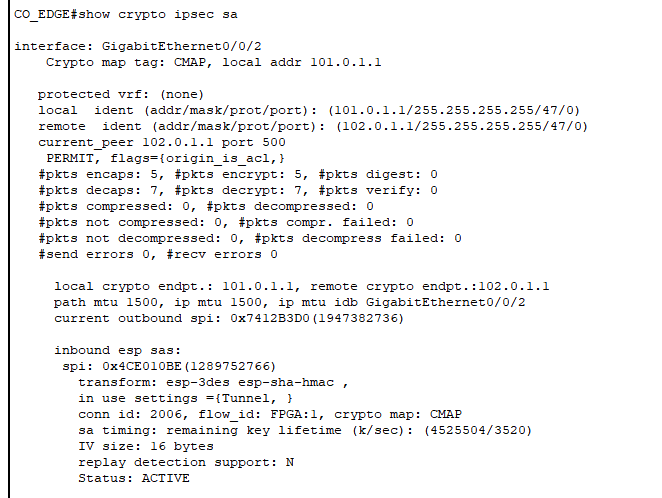
·注意:需要手动ping通之后才会有 ipsec 状态:
# CO_EDGE:
ping 10.0.0.2
show crypto isakmp sa
show crypto ipsec sa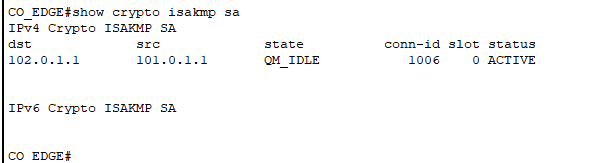
2、两台相同机器上的 第二个VPN:
因为两个tunnel都是相同网段,因此需要划分一下网段
# CO_EDGE:
interface Tunnel1
 ip address 10.0.0.5 255.255.255.252
 tunnel source GigabitEthernet0/0/2
 tunnel destination 102.0.1.1
ip route 172.16.0.0 255.255.0.0 10.0.0.6

# BO_EDGE:
interface Tunnel1
 ip address 10.0.0.6 255.255.255.252
 tunnel source GigabitEthernet0/0/0
 tunnel destination 101.0.1.1
ip route 192.168.0.0 255.255.0.0 10.0.0.5