HSRP 配置.note
HSRP 和 VRRP 都会生成一个 虚拟 MAC地址 ,用作 虚拟网关 使用
配置代码一般需要指定 组号 ,否则默认为配置 组 0 。
HSRP 默认不开启抢占,需要手动开启
- 拓扑图:
1.
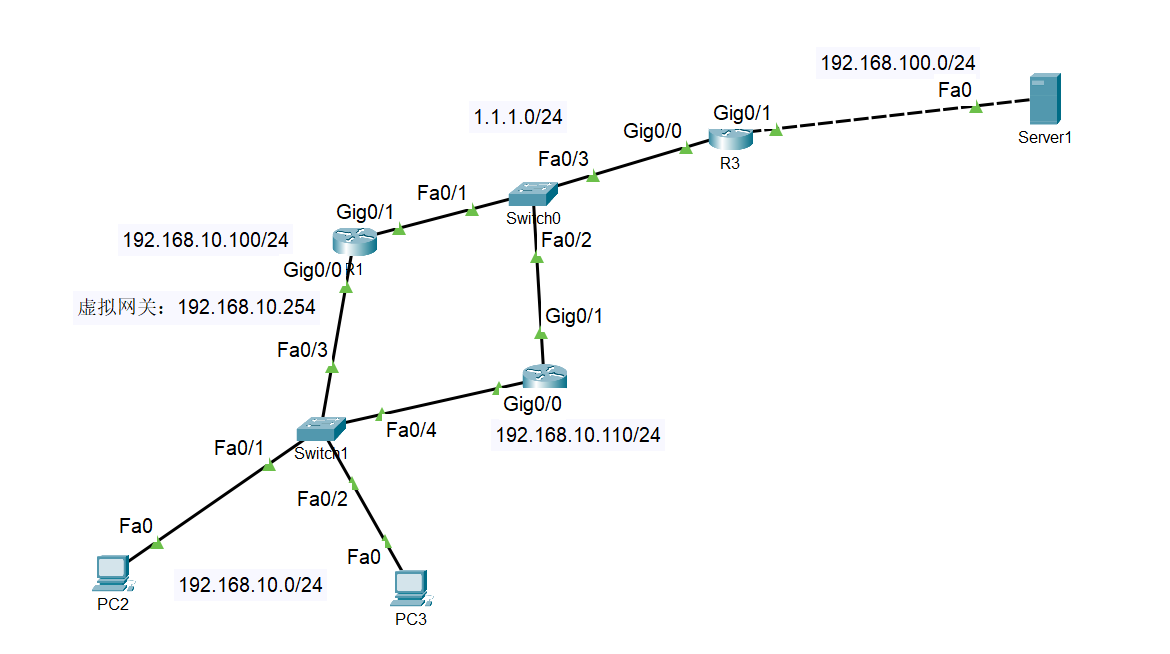
先保障基础连通性:
主:
in g0/0    //进入内网接口(网关的那个接口)
standby version 2    //设置版本为 2
standby 1 ip 192.168.10.254    //设置 虚拟网关ip ,同时指定 组号为 1
standby 1 priority 101    //设置优先级,默认为 100(优先级大的成为 主路由器)
standby 1 preempt    //开启 活动路由器抢占功能(若果不开启,当主路由器 DOWN掉 ,则备份路由器不会切换过去成为主路由器)
standby 1 track gig0/1 //监控指定端口,指定端口故障则降低优先级(pt默认降低 10 ,CML2可以自定义)- 备:
1.
in g0/0    ////进入内网接口
standby version 2    //设置版本为 2
standby 1 ip 192.168.10.254    //'组号' 与 '虚拟网关'需要与 主路由器相同
standby 1 priority 100    //优先级默认为 100 (需要大于主路由器 自降优先级后的大小,以确保 主备切换)
standby 1 preempt    //开启抢占功能
standby 1 track gig0/0 //备份路由器可以省略- 解释:
1.
in [内网接口]
standby version [1 or 2]
standby [组号] ip [终端的网关]
standby [组号] priority [0~255优先级]
standby [组号] preempt
standby [组号] track [要监控的接口]- tracert 测试:
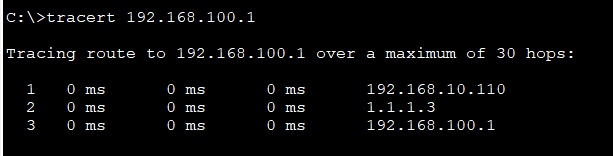
1.
tracert 192.168.100.1