C模块.note
一、链路聚合:
DSW1:
inserthostname-here(config-if-range)#no sh
inserthostname-here(config-if-range)#sw tr en do

inserthostname-here(config-if-range)#sw mo tr
inserthostname-here(config-if-range)#channel-group 1 mode active
inserthostname-here(config-if-range)#int port-channel 1

inserthostname-here(config-if)#no sh

inserthostname-here(config-if)#sw tr en do

inserthostname-here(config-if)#sw mo tr
inserthostname-here(config-if)#backup interface G1/2     //设置备份接口

DSW2:
inserthostname-here(config-if-range)#no sh
inserthostname-here(config-if-range)#sw tr en do

inserthostname-here(config-if-range)#sw mo tr
inserthostname-here(config-if-range)#channel-group 1 mode passive
...inserthostname-here(config-if-range)#int port-channel 1

inserthostname-here(config-if)#no sh

inserthostname-here(config-if)#sw tr en do

inserthostname-here(config-if)#sw mo tr
inserthostname-here(config-if)#backup interface G1/2
二、VTP 同步 MST:
配置:(在 配置好 VTPv3 的前提下)
- DSW1:
1.
en
conf t
vtp mode server mst
exit
vtp primary mst- DSW2、ASW1、ASW2:
1.
en
conf t
vtp mode client mst
spanning-tree mode mst- DSW1:
1.
spa mode mst
spa mst co
name cisco
revision 2
instance 1 vlan 10
instance 2 vlan 20
exit- DSW2、ASW1、ASW2:
1.
show run | sec mst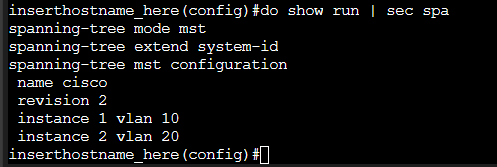
三、GLBP:
inserthostname-here(config)#key chain KEY

inserthostname-here(config-keychain)#key 1
inserthostname-here(config-keychain-key)#key-string Skills39!
inserthostname-here(config-keychain-key)#cryptographic-algorithm hmac-sha-256
inserthostname-here(config-if)#glbp 1 ip 172.16.1.254
inserthostname-here(config-if)#glbp 1 preempt     //开启抢占
inserthostname-here(config-if)#glbp 1 authentication md5 key-chain KEY    //MD5 + 哈希256 加密
inserthostname-here(config-if)#glbp 1 priority 100
inserthostname-here(config-if)#glbp 1 load-balancing host-dependent     //使用题目指定的负载均衡方式

# 对端配置一样,优先级设置为 99
四、IPSec VPN:
EF1:
inserthostname-here(config-ipsec-proposal)# crypto ipsec ikev2 ipsec-proposal IPSEC
inserthostname-here(config-ipsec-proposal)# protocol esp encryption aes-256
inserthostname-here(config-ipsec-proposal)# protocol esp integrity sha-256
五、ansible:
1、设备初始化:
username admin password Skills39!
inserthostname-here(config)#enable secret Skills39
inserthostname-here(config)#crypto key gen rsa modulus 2048 label ssk.key
inserthostname-here(config)#ip ssh version 2
inserthostname-here(config)#lin vty 0 15
inserthostname-here(config-line)#login local
inserthostname-here(config-line)#transport input ssh
exit
2、Linux 连接:
apt install -y ansible python3 python3-paramiko
# ansible.cfg 文件和 正常 Linux 一样
# 提权配置文件可以 zeal 抄
# /etc/ssh/ssh_config 文件可以使用 sshd -T | grep ke 抄
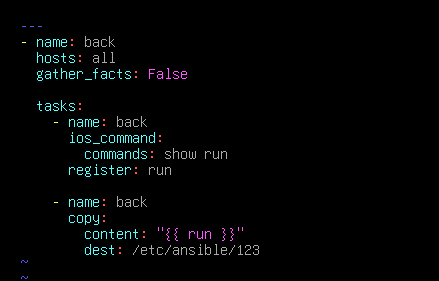
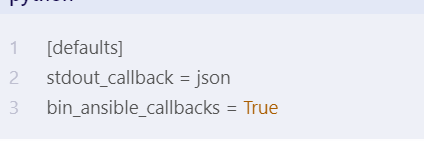
3、剧本:
二层隔离:应该是进入接口输入 switport