IKEv1 预共享密钥 DMVPN.note
# 可以先看第一个网址
https://www.cisco.com/c/zh_cn/support/docs/security-vpn/ipsec-negotiation-ike-protocols/41940-dmvpn.html#solution
https://www.cisco.com/c/en/us/td/docs/ios-xml/ios/ipaddr_nhrp/configuration/xe-3s/nhrp-xe-3s-book/config-nhrp.html#GUID-8EF63494-4FAA-4926-A67C-40D71FBBF9B6
https://www.cisco.com/c/en/us/td/docs/ios-xml/ios/ipaddr_nhrp/configuration/xe-3s/nhrp-xe-3s-book/config-nhrp.html

dmVPN(dynamic multipoint VPN 动态多点VPN):
使用 mGRE建立隧道,nhrp进行下一跳寻址,IPSec进行数据流量加密
·开启nhrp 第三阶段:
# 看题目有没有要求(如果是主观评分就需要配置)
## 开启重定向,去往分支的路由,会在中心路由器本地有一个 nhrp的路由表(在中心路由器配置即可)
ip nhrp redirect
·新配置:
# 旧的配置是使用:
ip nhrp map 10.0.0.1 200.1.1.1    //map [隧道地址] [对端公网地址]
ip nhrp map muil
(新配置)一、配置dmVPN(点对多点,分支之间不建立隧道,只由中心路由器与分支路由器建立隧道,分支之间的通信,由中心路由器进行加密转发):
缺点:因为分支之间没有建立起隧道,因此分支之间通信的流量都将通过中心路由器进行加密转发,使得中心路由器的延迟和负载增加两倍。
·环境:
HQ --BR1 -- BR2
(如果没有说明,那么一般 HQ(总部)就是作为 dmVPN 的主设备)
1、第一种配置方法:
1、先配置mGRE + nhrp:
(1)HQ:
interface Tunnel0    //进入 Tunnel 接口

 ip address 10.0.0.1 255.255.255.0    //配置隧道 IP地址
 tunnel source Loopback0    //设置隧道源地址为 Loopback 0

 tunnel mode gre multipoint

    //设置模式为 mGRE
 ip nhrp authentication Pa$$worD    //(可选)设置身份验证

 ip nhrp network-id 1    //设置 nhrp id(所有设备id必须相同)
 ip nhrp redirect    //开启nhrp第三阶段(开启重定向)一定要配置,有时评分可能会检查(在中心路由器开启即可)

end
# 接下来配置 IPsec 算法然后引入即可
·查看 mGRE 隧道:
show ip nhrp(2)BR1:
interface Tunnel0

 ip address 10.0.0.2 255.255.255.0


 ip nhrp authentication Pa$$worD

 ip nhrp network-id 1
 ip nhrp shortout  //默认开启,故障排除时可能会关闭,这个需要注意

 ip nhrp nhs 10.0.0.1 nbma 1.1.1.1 multicast    //设置‘10.0.0.1’为主设备隧道地址,‘1.1.1.1’为主设备的接口地址(理解为:要去访问10.0.0.1,就需要通过1.1.1.1 去进行访问)

 tunnel source Loopback0

 tunnel mode gre multipoint

end
## 配置完后尝试 ping 主设备(ping通了再配置 IPSec)
do ping 1.1.1.1    //先ping主设备接口
do ping 10.0.0.1    //再ping隧道地址

# 接下来配置 IPsec 算法然后引入即可
·查看 mGRE 隧道:
show ip nhrp(3)BR2:
interface Tunnel0

 ip address 10.0.0.3 255.255.255.0


 ip nhrp authentication Pa$$worD

 ip nhrp network-id 1
 ip nhrp shortout  //默认开启,故障排除时可能会关闭,这个需要注意

 ip nhrp nhs 10.0.0.1 nbma 1.1.1.1 multicast

 tunnel source Loopback0

 tunnel mode gre multipoint

end
## 配置完后尝试 ping 主设备(ping通了再配置 IPSec)
do ping 1.1.1.1    //先ping主设备接口
do ping 10.0.0.1    //再ping隧道地址

# 接下来配置 IPsec 算法然后引入即可
·查看 mGRE 隧道:
show ip nhrp2、再配置 IPSec 算法:(这个很简单,以前的笔记里有)
·三台设备都一样:
(1)HQ:
HQ(config)#crypto isakmp policy 1
# 这里按照题目要求配置加密算法即可
HQ(config-isakmp)#encryption aes 256
HQ(config-isakmp)#hash sha256
HQ(config-isakmp)#authentication pre-share     //使用预共享密钥进行身份验证
HQ(config-isakmp)#group 14    //配置 DH
HQ(config-isakmp)#exit
# 设置预共享密钥,并指定对端公网地址
HQ(config)#crypto isakmp key P@ssword address 0.0.0.0 0.0.0.0    //因为是多点VPN,所以对端地址设置为所有:‘0.0.0.0/0’(只写0.0.0.0不写掩码也可以)
# 指定IPSEC算法,并设置加密模式
HQ(config)# crypto ipsec transform-set IPSEC esp-aes 256 esp-sha256-hmac
HQ(cfg-crypto-trans)#mode transport
HQ(cfg-crypto-trans)#exit

# 与 IPSec 不同,使用 profile
HQ(config)#crypto ipsec profile PROFILE    //定义一个profile,名称为“PROFILE”
HQ(ipsec-profile)#set transform-set IPSEC    //关联前面创建的‘IPSEC’算法
HQ(ipsec-profile)#exit

# 进入 tunnel 接口应用 prifile:
HQ(config)#interface tunnel 0
HQ(config-if)#tunnel protection ipsec profile PROFILE    //应用profile
·查看 IPSec建立是否成功:
show crypto isakmp sa
show crypto isakmp sa count
(2)BR1:
BR1(config)#crypto isakmp policy 1
BR1(config-isakmp)#encryption aes 256
BR1(config-isakmp)#hash sha256
BR1(config-isakmp)#authentication pre-share
BR1(config-isakmp)#group 14
BR1(config-isakmp)#exit
BR1(config)#crypto isakmp key P@ssword address 1.1.1.1
BR1(config)#crypto ipsec transform-set IPSEC esp-aes 256 esp-sha256-hmac
BR1(cfg-crypto-trans)#mode transport
BR1(cfg-crypto-trans)#exit
BR1(config)#crypto ipsec profile PROFILE
BR1(ipsec-profile)#set transform-set IPSEC

BR1(ipsec-profile)#exit
BR1(config)#interface tunnel 0
BR1(config-if)#tunnel protection ipsec profile PROFILE
BR1(config-if)#exit
·查看 IPSec建立是否成功:
show crypto isakmp sa
show crypto isakmp sa count
(3)BR2:
BR2(config)#crypto isakmp policy 1

BR2(config-isakmp)#encryption aes 256

BR2(config-isakmp)#hash sha256

BR2(config-isakmp)#authentication pre-share

BR2(config-isakmp)#group 14

BR2(config-isakmp)#exit

BR2(config)#crypto isakmp key P@ssword address 1.1.1.1

BR2(config)#crypto ipsec transform-set IPSEC esp-aes 256 esp-sha256-hmac

BR2(cfg-crypto-trans)#mode transport

BR2(cfg-crypto-trans)#exit

BR2(config)#crypto ipsec profile PROFILE

BR2(ipsec-profile)#set transform-set IPSEC

BR2(ipsec-profile)#exit

BR2(config)#interface tunnel 0

BR2(config-if)#tunnel protection ipsec profile PROFILE

BR2(config-if)#exit
·查看 IPSec建立是否成功:
show crypto isakmp sa
show crypto isakmp sa count
(4)配置通向对端设备内网的路由:
HQ内网网段:192.168.0.0/16
BR1内网网段:172.16.10.0/24
BR2内网网段:172.16.20.0/24
# HQ:
ip route 172.16.10.0 255.255.255.0 10.0.0.2    //指向 BR1(指向tunnel0口不行,因为是多点VPN,主设备并不知道要去找哪个设备)
ip route 172.16.20.0 255.255.255.0 10.0.0.3    //指向 BR2

# BR1:
ip route 192.168.0.0 255.255.0.0 tunnel 0    //指向 HQ(可以直接指向dmVPN主设备)

# BR2
ip route 192.168.0.0 255.255.0.0 tunnel 0    //指向 HQ
(旧配置)一.2、配置dmVPN(点对多点 的第二种配置方式):
### 在 动态路由协议中输入即可(最终也会同步到mGRE隧道的配置中)
因为通过mGRE学习的路由会通过同一接口广播返回,因此需要在GRE隧道上关闭 mGRE隧道的水平分割(中心和分支都需要关闭):
1、如果动态路由使用的是RIP:
# 中心/分支:
no ip split-horizon
2、如果是 EIGRP:
# 中心/分支:
no ip split-horizon eigrp [AS号]
3、如果是 OSPF:
(因为OSPF是链路状态协议,不存在水平分割问题,但是需要将OSPF网络类型配置为点到多点)
ip ospf network broadcast
# 除此之外,还需要保证中心路由器是该 IPSec + mGRE 网络中唯一的 DR:
## 中心路由器:
ip ospf network broadcast
ip ospf priority 1
## 其它所有分支路由器:
ip ospf network broadcast
ip ospf priority 2(大于1即可,只要不选举成DR,随便设置)

### 将 Tunnel 网段通告进了哪个动态路由协议,就使用哪个
### 在 动态路由协议中输入即可(最终也会同步到mGRE隧道的配置中)
(1)配置 中心路由器:
crypto isakmp policy 1
 authentication pre-share
 # 加密算法自定义
crypto isakmp key P@ssword address 0.0.0.0    //因为是多点VPN,所以对端地址设置为所有:‘0.0.0.0/0’

crypto ipsec transform-set TRAN esp-des esp-md5-hmac
 mode transport

crypto ipsec profile PROFILE
 set transform-set TRAN

interface Tunnel 0
 ip address 10.0.0.1 255.255.255.0
 tunnel source G3
 ip nhrp network-id 1
 ip nhrp authentication P@ssword
 tunnel mode gre multipoint
 ip nhrp map multicast dynamic    //相比于前面的,增加了这条
 ip nhrp redirect    //开启nhrp第三阶段(开启重定向)一定要配置,有时评分可能会检查(在中心路由器开启即可)
 tunnel protection ipsec profile PROFILE
 no ip split-horizon eigrp 3947    //因为这里使用的是 EIGRP,因此需要关闭eigrp的水平分割
·查看 dmVPN信息:
show ip nhrp
show crypto isakmp sa
show crypto isakmp sa count
(2)配置 分支路由器1(Spoke 1):
crypto isakmp policy 1
 authentication pre-share
 # 加密算法自定义
crypto isakmp key P@ssword address 0.0.0.0 0.0.0.0

crypto ipsec transform-set TRAN esp-des esp-md5-hmac
 mode transport

crypto ipsec profile PROFILE
 set transform-set TRAN

interface Tunnel 0
 ip address 10.0.0.2 255.255.255.0
 tunnel source G1
 tunnel mode gre multipoint
 tunnel protection ipsec profile PROFILE
 ip nhrp network-id 1
 ip nhrp authentication P@ssword
 ip nhrp map 10.0.0.1 1.1.1.1    //指定中心路由器的 tunnel 地址和 公网地址的映射(相较于上面,修改了这条)
 ip nhrp map multicast 1.1.1.1    //指定中心路由器的公网地址(相较于上面,修改了这条)
 ip nhrp nhs 10.0.0.1
·查看 dmVPN信息:
show ip nhrp
show crypto isakmp sa
show crypto isakmp sa count
二、配置dmVPN(多点VPN)【单个中心路由器】
改善了上面的dmVPN,分支与分支之间、分支与中心之间,都会建立隧道,减少中心路由器的负担。
因为通过mGRE学习的路由会通过同一接口广播返回,因此需要在GRE隧道上关闭 mGRE隧道的水平分割(中心和分支都需要关闭):
1、如果动态路由使用的是RIP:
no ip split-horizon
2、如果是 EIGRP:
no ip split-horizon eigrp [AS号]
3、如果是 OSPF:
(因为OSPF是链路状态协议,不存在水平分割问题,但是需要将OSPF网络类型配置为点到多点)
ip ospf network broadcast
# 除此之外,还需要保证中心路由器是该 IPSec + mGRE 网络中唯一的 DR:
## 中心路由器:
ip ospf priority 1
## 其它所有分支路由器:
ip ospf priority 2(大于1即可,只要不选举成DR,随便设置)

### 将 Tunnel 网段通告进了哪个动态路由协议,就使用哪个
1、配置 中心路由器:
crypto isakmp policy 1
 authentication pre-share
 # 加密算法自定义
crypto isakmp key P@ssword address 0.0.0.0    //因为是多点VPN,所以对端地址设置为所有:‘0.0.0.0/0’

crypto ipsec transform-set TRAN esp-des esp-md5-hmac
 mode transport

crypto ipsec profile PROFILE
 set transform-set TRAN

interface Tunnel 0
 ip address 10.0.0.1 255.255.255.0
 tunnel source G3
 ip nhrp network-id 1
 ip nhrp authentication P@ssword
 tunnel mode gre multipoint
 ip nhrp map multicast dynamic    //这条可以不配置,因为默认就有
 ip nhrp redirect    //开启nhrp第三阶段(开启重定向)一定要配置,有时评分可能会检查(在中心路由器开启即可)
 tunnel protection ipsec profile PROFILE
 no ip split-horizon eigrp 3947    //因为这里使用的是 EIGRP,因此需要关闭eigrp的水平分割
·查看 dmVPN信息:
show ip nhrp
show crypto isakmp sa
show crypto isakmp sa count
2、配置 分支路由器1(Spoke 1):
crypto isakmp policy 1
 authentication pre-share
 # 加密算法自定义
crypto isakmp key P@ssword address 0.0.0.0 0.0.0.0

crypto ipsec transform-set TRAN esp-des esp-md5-hmac
 mode transport

crypto ipsec profile PROFILE
 set transform-set TRAN

interface Tunnel 0
 ip address 10.0.0.2 255.255.255.0
 tunnel source G1
 tunnel mode gre multipoint
 tunnel protection ipsec profile PROFILE
 ip nhrp network-id 1
 ip nhrp authentication P@ssword
 ip nhrp map 10.0.0.1 1.1.1.1    //指定中心路由器的 tunnel 地址和 公网地址的映射(相较于上面,修改了这条)
 ip nhrp map multicast 1.1.1.1    //指定中心路由器的公网地址(相较于上面,修改了这条)
 ip nhrp nhs 10.0.0.1
 # 接下来定义 另一个 spoke 的地址:
 ip nhrp map 10.0.0.3 1.1.1.3
 ip nhrp map multicast 1.1.1.3
 ip nhrp nhs 10.0.0.3
·查看 dmVPN信息:
show ip nhrp
show crypto isakmp sa
show crypto isakmp sa count
3、配置 分支路由器2(Spoke 2):
crypto isakmp policy 1
 authentication pre-share
 # 加密算法自定义
crypto isakmp key P@ssword address 0.0.0.0 0.0.0.0

crypto ipsec transform-set TRAN esp-des esp-md5-hmac
 mode transport

crypto ipsec profile PROFILE
 set transform-set TRAN

interface Tunnel 0
 ip address 10.0.0.3 255.255.255.0
 tunnel source G1
 tunnel mode gre multipoint
 tunnel protection ipsec profile PROFILE
 ip nhrp network-id 1
 ip nhrp authentication P@ssword
 ip nhrp map 10.0.0.1 1.1.1.1    //指定中心路由器的 tunnel 地址和 公网地址的映射(相较于上面,修改了这条)
 ip nhrp map multicast 1.1.1.1    //指定中心路由器的公网地址(相较于上面,修改了这条)
 ip nhrp nhs 10.0.0.1
 # 接下来定义 另一个 spoke 的地址:
 ip nhrp map 10.0.0.2 1.1.1.2
 ip nhrp map multicast 1.1.1.2
 ip nhrp nhs 10.0.0.2
·查看 dmVPN信息:
show ip nhrp
show crypto isakmp sa
show crypto isakmp sa count
三、配置dmVPN(多点VPN)【两个中心路由器】
用于出口路由器有着双网关的情况
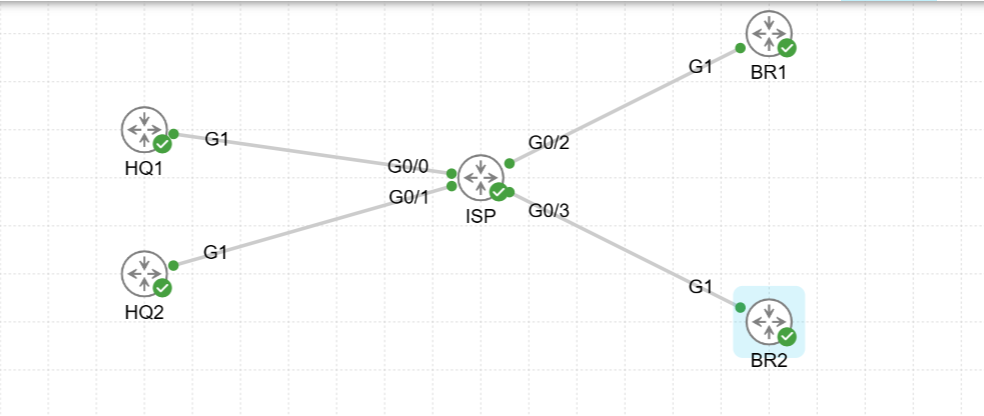
1、配置 中心路由器1:
# 配置 IPSec 算法
crypto isakmp policy 1

 authentication pre-share

crypto isakmp key P@ssword address 0.0.0.0

crypto ipsec transform-set TRAN esp-des esp-md5-hmac

 mode transport

crypto ipsec profile PROFILE

 set transform-set TRAN

# 配置 Tunnel 隧道:
interface Tunnel0

 ip address 10.0.0.1 255.255.255.0


 ip nhrp authentication P@ssword

 ip nhrp network-id 1
 ip nhrp redirect    //开启nhrp第三阶段(开启重定向)一定要配置,有时评分可能会检查(在中心路由器开启即可)

 tunnel source Loopback0

 tunnel mode gre multipoint

 tunnel protection ipsec profile PROFILE
2、配置 中心路由器2:
# 配置 IPSec 算法
crypto isakmp policy 1

 authentication pre-share

crypto isakmp key P@ssword address 0.0.0.0

crypto ipsec transform-set TRAN esp-des esp-md5-hmac

 mode transport

crypto ipsec profile PROFILE

 set transform-set TRAN

# 配置 Tunnel 隧道:
interface Tunnel0

 ip address 10.0.0.2 255.255.255.0


 ip nhrp authentication P@ssword

 ip nhrp network-id 1
 ip nhrp redirect    //开启nhrp第三阶段(开启重定向)一定要配置,有时评分可能会检查(在中心路由器开启即可)

 tunnel source Loopback0

 tunnel mode gre multipoint

 tunnel protection ipsec profile PROFILE
3、配置 分支路由器1:
# 配置 IPSec 算法
crypto isakmp policy 1

 authentication pre-share

crypto isakmp key P@ssword address 0.0.0.0

crypto ipsec transform-set TRAN esp-des esp-md5-hmac

 mode transport

crypto ipsec profile PROFILE

 set transform-set TRAN

# 配置 Tunnel 隧道:
interface Tunnel0

 ip address 10.0.0.3 255.255.255.0


 ip nhrp authentication P@ssword

 ip nhrp map 10.0.0.1 1.1.1.1

 ip nhrp map multicast 1.1.1.1

 ip nhrp map 10.0.0.2 1.1.1.2

 ip nhrp map multicast 1.1.1.2

 ip nhrp map 10.0.0.4 1.1.1.4

 ip nhrp map multicast 1.1.1.4

 ip nhrp network-id 1

 ip nhrp nhs 10.0.0.1

 ip nhrp nhs 10.0.0.2

 ip nhrp nhs 10.0.0.4

 tunnel source Loopback0

 tunnel mode gre multipoint

 tunnel protection ipsec profile PROFILE
4、配置 分支路由器2:
# 配置 IPSec 算法
crypto isakmp policy 1

 authentication pre-share

crypto isakmp key P@ssword address 0.0.0.0

crypto ipsec transform-set TRAN esp-des esp-md5-hmac

 mode transport

crypto ipsec profile PROFILE

 set transform-set TRAN

# 配置 Tunnel 隧道:
interface Tunnel0

 ip address 10.0.0.4 255.255.255.0


 ip nhrp authentication P@ssword

 ip nhrp map 10.0.0.1 1.1.1.1

 ip nhrp map multicast 1.1.1.1

 ip nhrp map 10.0.0.2 1.1.1.2

 ip nhrp map multicast 1.1.1.2

 ip nhrp map 10.0.0.3 1.1.1.3

 ip nhrp map multicast 1.1.1.3

 ip nhrp network-id 1

 ip nhrp nhs 10.0.0.1

 ip nhrp nhs 10.0.0.2

 ip nhrp nhs 10.0.0.3

 tunnel source Loopback0

 tunnel mode gre multipoint

 tunnel protection ipsec profile PROFILE
·两个中心之间也能够建立联系:
# 中心一:
int tunn 0
 ip nhrp map 10.0.0.2 1.1.1.2
 ip nhrp map multicast 1.1.1.2
 ip nhrp nhs 10.0.0.2
## 其实敲完一端就已经建立成功了,但是建议两端都配置

# 中心二:
int tunn 0
 ip nhrp map 10.0.0.1 1.1.1.1
 ip nhrp map multicast 1.1.1.1
 ip nhrp nhs 10.0.0.2