IKEv1+预共享密钥.note
·拓扑:
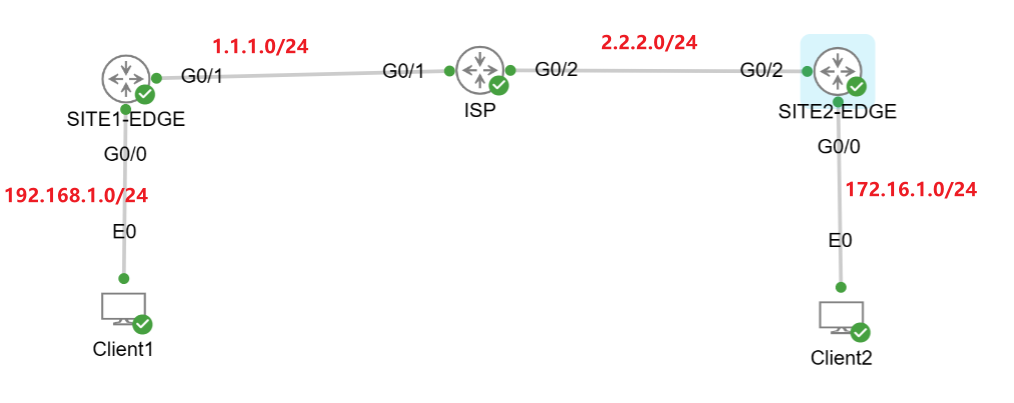
一、配置 GRE-over-IPSec(在没有配置 IPSec 的基础上):
1、SITE1-EDGE:
# 设置 进行协商要使用的 协议和算法,并指定认证方式
SITE1-EDGE(config)#crypto isakmp policy 1
SITE1-EDGE(config-isakmp)#encryption aes 256
SITE1-EDGE(config-isakmp)#hash sha256
SITE1-EDGE(config-isakmp)#authentication pre-share
SITE1-EDGE(config-isakmp)#group 14
SITE1-EDGE(config-isakmp)#exit

# 设置预共享密钥
SITE1-EDGE(config)#crypto isakmp key Skills39 address 2.2.2.1    //指定预共享密钥为:‘Skills39’,对端公网地址为:2.2.2.1

# 设置 IPSec 隧道模式
SITE1-EDGE(config)#crypto ipsec transform-set IPSEC esp-aes 256 esp-sha256-hmac
SITE1-EDGE(cfg-crypto-trans)#mode transport
SITE1-EDGE(cfg-crypto-trans)#exit

# 配置 tunnel 隧道:
SITE1-EDGE(config)#interface tunnel 0
SITE1-EDGE(config-if)#ip add 10.0.0.1 255.255.255.252
SITE1-EDGE(config-if)#tunnel source G0/1
SITE1-EDGE(config-if)#tunnel destination 2.2.2.1

# 设置 ACL 匹配 GRE 流量
SITE1-EDGE(config)#ip access-list extended VPN
SITE1-EDGE(config-ext-nacl)#permit gre host 1.1.1.1 host 2.2.2.1
SITE1-EDGE(config-ext-nacl)#exit

# 关联 IPSec 和 ACL 配置
SITE1-EDGE(config)#crypto map VPN_MAP 1 ipsec-isakmp
SITE1-EDGE(config-crypto-map)#set peer 2.2.2.1
SITE1-EDGE(config-crypto-map)#set transform-set IPSEC
SITE1-EDGE(config-crypto-map)#match address VPN
SITE1-EDGE(config-crypto-map)#exit

# 在 接口应用 IPSec VPN
SITE1-EDGE(config)#interface G0/1
SITE1-EDGE(config-if)#crypto map VPN_MAP
SITE1-EDGE(config-if)#exit

# 配置 路由:
方式一:静态路由
SITE1-EDGE(config)#ip route 172.16.1.0 255.255.255.0 tunnel 0

方式二:动态路由
SITE1-EDGE(config)#router eigrp 1
SITE1-EDGE(config-router)#no auto-summary
SITE1-EDGE(config-router)#network 10.0.0.0 0.0.0.3
SITE1-EDGE(config-router)#network 172.16.1.0 0.0.0.255
2、SITE2-EDGE:
# 设置 进行协商要使用的 协议和算法,并指定认证方式
SITE2-EDGE(config)#crypto isakmp policy 1
SITE2-EDGE(config-isakmp)#encryption aes 256
SITE2-EDGE(config-isakmp)#hash sha256
SITE2-EDGE(config-isakmp)#authentication pre-share
SITE2-EDGE(config-isakmp)#group 14
SITE2-EDGE(config-isakmp)#exit

# 设置预共享密钥
SITE2-EDGE(config)#crypto isakmp key Skills39 address 1.1.1.1    //指定预共享密钥为:‘Skills39’,对端公网地址为:1.1.1.1

# 设置 IPSec 隧道模式
SITE2-EDGE(config)#crypto ipsec transform-set IPSEC esp-aes 256 esp-sha256-hmac
SITE2-EDGE(cfg-crypto-trans)#mode transport
SITE2-EDGE(cfg-crypto-trans)#exit

# 配置 tunnel 隧道:
SITE2-EDGE(config)#interface tunnel 0
SITE2-EDGE(config-if)#ip add 10.0.0.2 255.255.255.252
SITE2-EDGE(config-if)#tunnel source G0/2
SITE2-EDGE(config-if)#tunnel destination 1.1.1.1

# 设置 ACL 匹配 GRE 流量
SITE2-EDGE(config)#ip access-list extended VPN
SITE2-EDGE(config-ext-nacl)#permit gre host 2.2.2.1 host 1.1.1.1
SITE2-EDGE(config-ext-nacl)#exit

# 关联 IPSec 和 ACL 配置
SITE2-EDGE(config)#crypto map VPN_MAP 1 ipsec-isakmp
SITE2-EDGE(config-crypto-map)#set peer 1.1.1.1
SITE2-EDGE(config-crypto-map)#set transform-set IPSEC
SITE2-EDGE(config-crypto-map)#match address VPN
SITE2-EDGE(config-crypto-map)#exit

# 在 接口应用 IPSec VPN
SITE2-EDGE(config)#interface G0/1
SITE2-EDGE(config-if)#crypto map VPN_MAP
SITE2-EDGE(config-if)#exit

# 配置 路由:
方式一:静态路由
SITE2-EDGE(config)#ip route 192.168.1.0 255.255.255.0 tunnel 0

方式二:动态路由
SITE2-EDGE(config)#router eigrp 1
SITE2-EDGE(config-router)#no auto-summary
SITE2-EDGE(config-router)#network 10.0.0.0 0.0.0.3
SITE2-EDGE(config-router)#network 192.168.1.0 0.0.0.255
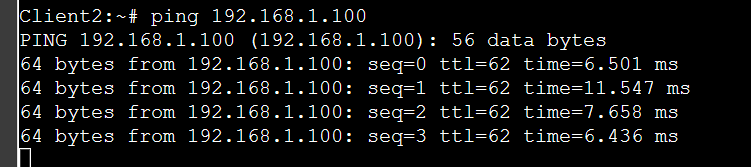
3、ping测试:
二、配置 GRE-over-IPSec(在提前配置了 IPSec 的基础上):
1、SITE1-EDGE:
# 修改 IPSec 模式:
do show run | sec crypto     //查看 前面配置的 IPsec 模式,将其复制
SITE1-EDGE(config)# crypto ipsec transform-set IPSEC esp-aes 256 esp-sha256-hmac
 SITE1-EDGE(cfg-crypto-trans)#mode transport     //修改模式为 传输模式

# 配置 GRE 隧道
SITE1-EDGE(config)#interface tunnel 0
SITE1-EDGE(config-if)#ip address 10.0.0.1 255.255.255.252
SITE1-EDGE(config-if)#tunnel source GigabitEthernet 0/1
SITE1-EDGE(config-if)#tunnel destination 2.2.2.1

# 修改 ACL 匹配的地址(不匹配 内网,匹配 GRE 流量)
SITE1-EDGE(config)#ip access-list extended GREOVERIPSEC
SITE1-EDGE(config-ext-nacl)#permit gre host 1.1.1.1 host 2.2.2.1

# 修改 map 匹配的 ACL
SITE1-EDGE(config)#do show run | sec crypto    //查看 crypto map ,并将其复制
SITE1-EDGE(config)#crypto map VPN-MAP 1 ipsec-isakmp
SITE1-EDGE(config-crypto-map)#match address GREOVERIPSEC    //修改 map 匹配的 ACL

# 配置 路由:
方式一:静态路由
SITE1-EDGE(config)#ip route 172.16.1.0 255.255.255.0 tunnel 0

方式二:动态路由
SITE1-EDGE(config)#router eigrp 1
SITE1-EDGE(config-router)#no auto-summary
SITE1-EDGE(config-router)#network 10.0.0.0 0.0.0.3
SITE1-EDGE(config-router)#network 192.168.1.0 0.0.0.255
2、SITE2-EDGE:
# 修改 IPSec 模式:
do show run | sec crypto     //查看 前面配置的 IPsec 模式,将其复制
SITE1-EDGE(config)# crypto ipsec transform-set IPSEC esp-aes 256 esp-sha256-hmac
 SITE1-EDGE(cfg-crypto-trans)#mode transport     //修改模式为 传输模式

# 配置 GRE 隧道
SITE2-EDGE(config)#interface tunnel 0
SITE2-EDGE(config-if)#ip address 10.0.0.2 255.255.255.252
SITE2-EDGE(config-if)#tunnel source G0/2
SITE2-EDGE(config-if)#tunnel destination 1.1.1.1

# 修改 ACL 匹配的地址(不匹配 内网,匹配 GRE 流量)
SITE1-EDGE(config)#ip access-list extended GREOVERIPSEC
SITE1-EDGE(config-ext-nacl)#permit gre host 2.2.2.1 host 1.1.1.1

# 修改 map 匹配的 ACL
SITE1-EDGE(config)#do show run | sec crypto    //查看 crypto map ,并将其复制
SITE1-EDGE(config)#crypto map VPN-MAP 1 ipsec-isakmp
SITE1-EDGE(config-crypto-map)#match address GREOVERIPSEC    //修改 map 匹配的 ACL

# 配置 路由:
方式一:静态路由
SITE2-EDGE(config)#ip route 192.168.1.0 255.255.255.0 tunnel 0

方式二:动态路由
SITE2-EDGE(config)#router eigrp 1
SITE2-EDGE(config-router)#no auto-summary
SITE2-EDGE(config-router)#network 10.0.0.0 0.0.0.3
SITE2-EDGE(config-router)#network 172.16.1.0 0.0.0.255静态路由原理:
将 去往 另一端内网的流量,使用静态路由指定到 GRE 隧道中,让 GRE隧道去进行传输
动态路由原理:
两台出口路由器在 公网使用 GRE 隧道地址建立 eigrp 邻居,后面再将 各自的内网地址通告进 eigrp 中 就能够实现通信
3、ping 测试:
