课堂笔记-9.27.note
smaba、vsftp、nfs用于共享文件系统
· nfs 主要用于 Linux 和 Linux 之间
· smaba 主要用于 Linux 和 Windows 之间,Linux 和 Linux 之间也可以
apt install vim bash-completion openssh-server apt search smaba
apt install aptitude
aptitude install smabacd /etc/samba/
ls
vim smb.conf //主配置文件samba 的几个角色:
主域控制器
成员服务器
独立服务器 //与Windows 无关的服务器
AD域 控制器
· 默认的角色是 独立服务器
使用 pam 认证
· 重启 samba 服务:
systemctl restart smbd
systemctl status smbd
ss -ntupl | grep smbd
ss -ntupl | grep nmbd
· smbd:
tcp 139、tcp 445 端口
· nmbd:
udp 137、udp 138 端口
· Linux 访问:
smb://192.168.10.82· Windows 访问:
\\192.168.10.82- 客户端:
1.
apt install samba-client
which smbclient    //客户端指令
smbclient -L 192.168.10.82
没有用户名,没有密码直接回车,以匿名用户登陆
smbclient //192.168.10.82/public
# 访问时只需要写共享文件的名字即可,不用写路径
ls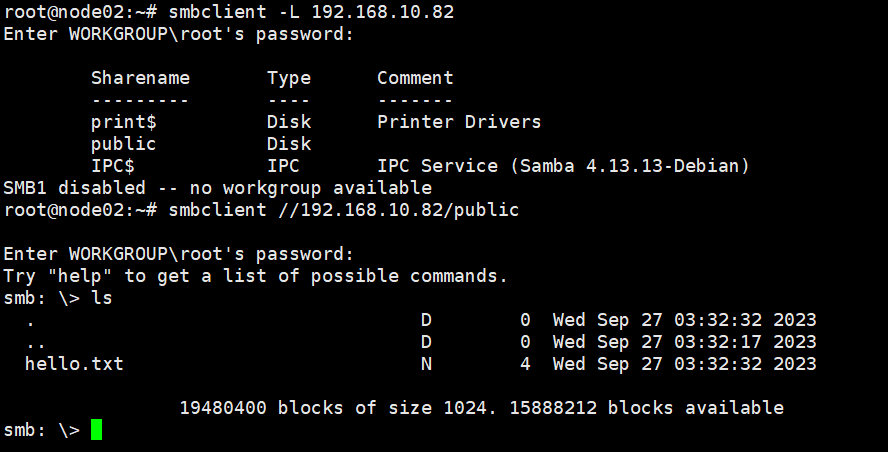
上传文件:
vim smb.conf
将 read only 改成 no
给予共享目录的写入权限
chmod 777 /samba/public
systemctl restart smbd
这样就能够写入了

客户端:
echo 1111 > 1111.txt
smbclient //192.168.10.82/public

ls
put 1111.txt    //上传文件
more 1111.txt    //查看文件
get 1111.txt    //下载文件
更改主机名后,需要更新 /etc/hosts 文件
apt install apt-file
apt-file 能够知道命令是由那个文件或服务提供的
apt-file update
apt-file search /usr/bin/smbpasswd- 配置源:
1.
vim /etc/fstab

mount -a

vim /etc/apt/sources.list
deb [trusted=yes] file:///media/cdrom0 bookworm main non-free-firmware- 添加 samba 密码:
1.
smbpasswd -a zhangsan
Skills39
Skills39

smbpasswd -a lisi
Skills39
Skills39