网卡配置文件
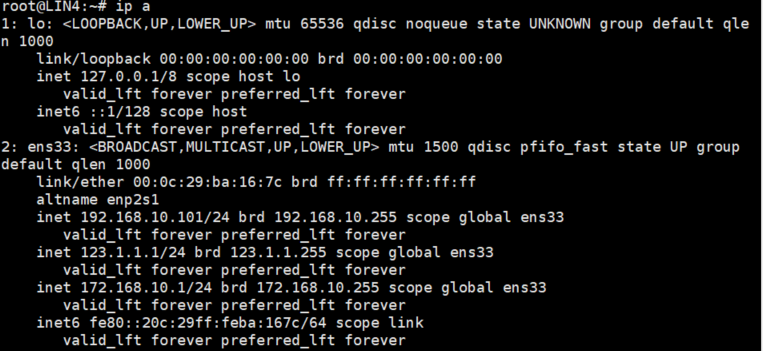
网卡配置文件:/etc/network/interfaces
网卡配置文件基础配置:
auto ens33iface ens33 inet staticaddress 192.168.1.1/24gateway 192.168.1.254[网卡模式] [网卡]iface [网卡] inet [网络模式:静态 or 动态]address [IP地址及掩码]gateway [网关]配置多张网卡自启动:
auto ens33 ens36 ens37iface ens33 inet staticaddress 192.168.10.1/24gateway 192.168.10.254up route add -net default netmask 0.0.0.0 dev ens33iface ens36 inet dhcpdown route del -net default netmask 0.0.0.0 dev ens33iface ens37 inet staticaddress 123.1.1.1/24down reboot这样写也是没有问题的:
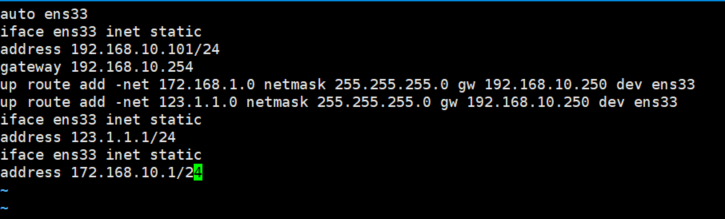
(一张网卡配置多个IP地址)
网卡模式:
1、auto 模式:
当网络接口处于 auto 模式时,系统会在启动时自动激活该接口 auto 模式用于实现自动激活网络接口
2、allow-hotplug 模式:
网卡配置文件的 allow-hotplug 模式用于实现在热插拔情况下自动激活网络接口。与 auto 模式不同,allow-hotplug 模式并不会在系统启动时立即激活接口,而是在接口被物理连接时自动激活