配置 NTP 时间同步
一、配置 基础NTP时间同步:
查看设备当前时间:
在 特权模式 下:show clock
手动设置时间:
在 特权模式 下:clock set [hh:mm:ss] [月份(英文缩写)] [天] [年]clock set 15:30:00 jun 12 2023
配置 NTP 服务器:
ntp master //设置当前设备为 NTP 服务器ntp master 1 //设置时间层级配置 NTP 客户端:
ntp server [ NTP 服务器的 IP地址] //指定 NTP服务器配置完成后,等待一段时间,会自动进行同步
·查看 NTP客户端时间同步状态:
show ntp associations show ntp status二、配置 NTP使用 md5 加密:
1、NTP 服务器配置:
先配置密钥ntp authenticate // 启用身份认证ntp authentication-key 1 md5 Skills39 // 设置密钥ntp trusted-key 1 // 将密钥设置为受信任的密钥# 再配置 ntp 服务器ntp masterntp master 1
2、NTP 客户端配置:
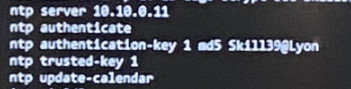
ntp authenticate ntp authentication-key 1 md5 Skills39 ntp trusted-key 1 ntp server 100.100.100.100 key 1三、配置 ISP 为 主NTP,配置 IR1 和 IR2 与ISP同步时间,他们之间互相同步作为备用方式:
ISP: 8.8.8.8IR1: 10.6.1.1IR2: 10.6.2.1


1、配置 ISP:
ntp masterntp master12、配置 IR1:
ntp server 8.8.8.8 preferntp server 10.6.2.13、配置 IR2:
ntp server 8.8.8.8 preferntp server 10.6.1.1四、配置ISP为主NTP服务器,IR1、IR2与ISP同步时间,其他设备与IR1、IR2同步时间,IR1为首选设备:
1、配置 ISP:
clock calendar-validntp master 12、配置 IR1、IR2:
IR1、IR2配置一样:clock calendar-validntp server 8.8.8.8 preferntp source Loopback1 //指定全局ntp源地址
3、其他ntp 客户端:
clock calendar-validntp server 10.10.0.1 prefer //主NTP服务器ntp server 10.10.0.11 //备份NTP服务器ntp source Loopback1·查看:


ISP:
IR1、IR2:
ntp客户端:

+ 号表示是候选ntp服务器(已经能够同步的)